Ad Library Extension: Save & Filter Ads
Denote's ad library extension enables you to save and filter ads from Facebook Ad Library, TikTok Creative Center, Instagram and more.


Helping creators & businesses everywhere work easier















What is Denote's Ad Library Extension?
Why choose Denote's Ad Library Extension?
Key Benefits of Ad Library Extension for Ads Saving
Denote's ad library extension combines saving and filtering in one tool, giving marketers a more complete workflow for ad research across Facebook, TikTok, and Instagram.
Filter Facebook Ads Directly Inside the Ad Library
Save Ads from Facebook, TikTok & Instagram in One Click
Organize & Share Ad Collections with Your Team
Key Features of Ad Library Extension
Filter Facebook Ad Library Results Before You Save Ads
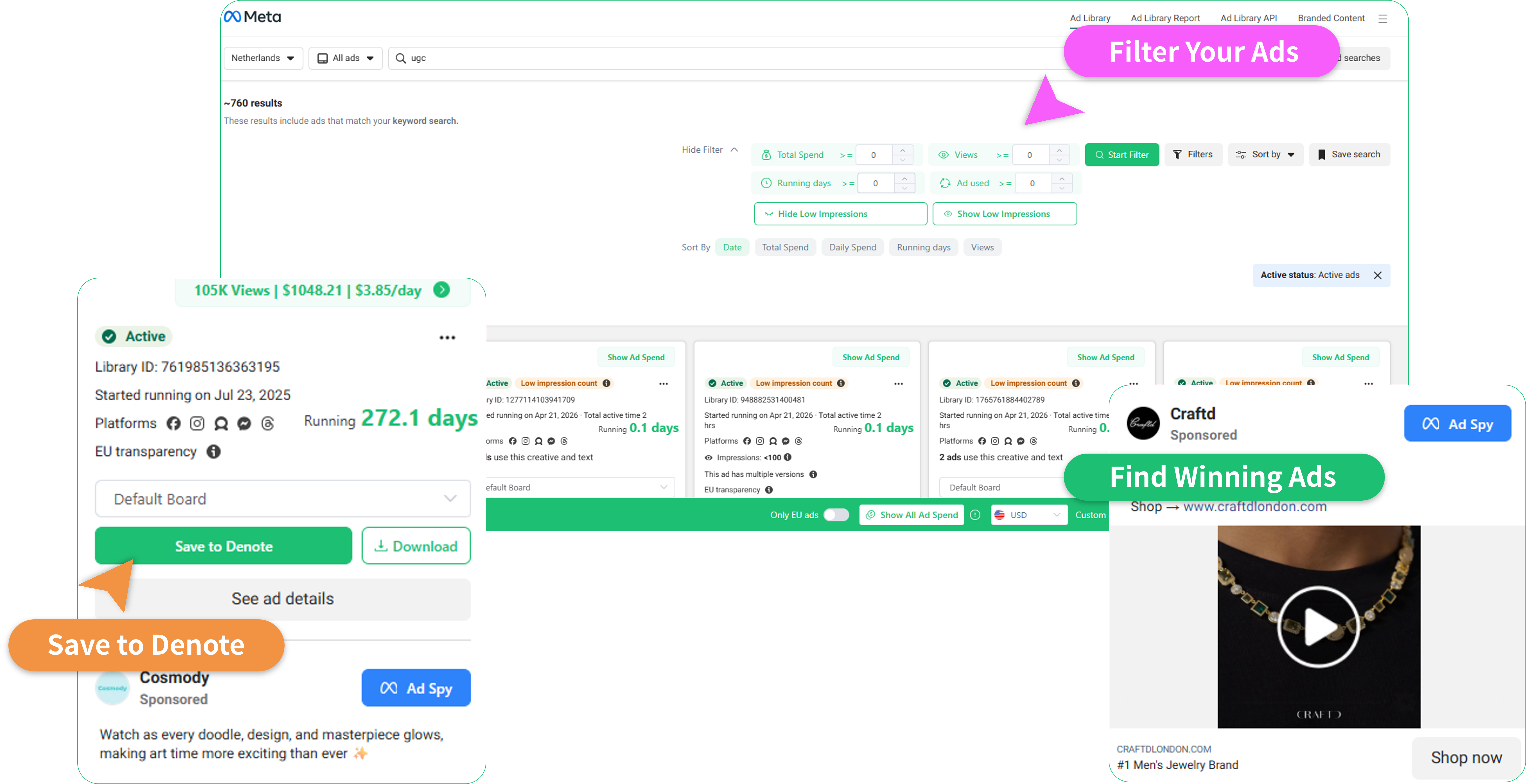
Denote's facebook ad library extension adds a filter panel directly on the page, letting you narrow by running days, views and ad spend. This is a feature no other ads library extension currently offers.
Install Extension FreeSave Ads from Any Platform with the Ad Library Extension in One Click
Denote's ad library extension adds a save button directly to Facebook Ad Library, TikTok Creative Center, and Instagram. One click captures the creative. Everything goes straight into your Denote workspace without interrupting your browsing flow.
Install Extension FreeOrganize Saved Ads into Boards and Keep Research Structured
Once ads are saved, Denote's ad library extension lets you sort them into boards by platforms, format, ad status and category. Your workspace becomes a structured, searchable creative library rather than a cluttered collection of saved links.
Install Extension FreeShare Ad Boards with Your Team or Clients
Denote's ads library extension makes sharing as simple as copying a link. Group saved ads into a board and send it to a teammate or client. This replaces screenshot folders, Google Drive dumps, and long email threads with a single clean visual reference.
Install Extension FreeHow to Use Ad Library Extension To Save and Filter
Getting started with Denote's ad library extension takes under a minute. Install it once and it works across Facebook Ad Library, TikTok, and Instagram.
Install the Ad Library Chrome Extension
Add Denote's ad library chrome extension to Chrome from the Web Store and pin it to your toolbar. Once installed, it activates automatically when you visit Facebook Ad Library, TikTok or Instagram. No extra configuration needed.
Filter and Browse Ads on Facebook Ad Library Or Other Platforms
On Facebook Ad Library, use Denote's built-in filter panel to narrow results by running days, views, ad spend. This is a unique feature of Denote's facebook ad library extension, most tools skip this step entirely. Also, Denote supports other platforms, including TikTok, Instagram, Youtube, etc. Once you find ads worth keeping, click the save button that appears on each ad.
Organize & Share Your Saved Ads
Open your Denote workspace to find all saved ads in one place. Share any board with your team or a client using a simple link. In this way, you can keep your research organized and accessible whenever you need it.
What Users Say About Denote's Ad Library Extension
Frequently Asked Questions (FAQs)
Here are FAQs (Frequently Asked Questions) for Denote Ad Library Extension:
Start Saving & Filtering Ads in One Click
Denote's ad library extension gives you the fastest way to save ads from Facebook, TikTok, and Instagram, plus the only built-in filter for Facebook Ad Library. Stop scrolling through irrelevant results. Find, save, organize, and share the ads that matter. Free to install, works instantly.
Install Extension Free