Ad Library: Free Discover 10M+ Ads
Browse 10 million real ads to explore, filter and save from Facebook, TikTok, YouTube, Instagram. Denote Ad Library helps you level up your creative ideas.

Rated 4.9+
by Denote Users

5M+ Creatives
Creatives Created
Trusted By 100+
Organizations
Helping creators & businesses everywhere work easier
















What is Denote Ad Library?
Denote Ad Library is a multi-platform creative research tool that gathers ads from major channels into one simple place. It lets you explore and save content from Meta, Facebook, TikTok, Instagram and more. You can search by media type or platform, view clean previews, and store your favorite pieces in your own adsLibrary workspace. It's designed to help you study trends, organize ideas, and keep all ad inspirations in one easy system.

Why Choose Ad Library for your creative research?
Jumping between Meta Ads Library, FB Ads Library, TikTok Ad Library and Google Ad Library slows down the entire research process. Ideas get scattered, assets are hard to sort, and comparing formats becomes tiring. With Denote Ad Library, all ads appear in one simple adsLibrary workspace, making it easier to search, group and save. This helps you spot trends faster and keep every creative reference organized in one place.Core Advantages of Denote Ad Library
Core Advantages of Denote Ad Library
Denote Ad Library gives you a faster and clearer way to explore ads across major platforms.
Denote Ad Library lets you browse a huge pool of creative ads from different channels. You can quickly scan trends, compare styles, and pick materials that match your needs. Denote makes it easy to view fresh ideas without jumping between tools.
Save multi-platform ads in one Denote workspace
Reduce research time with Denote's smart workflow
Features
Key Features of Denote Ad Library
Denote Ad Library provides practical, high-impact tools that help you discover ideas, organize insights, and refine your creative decisions with confidence.

Find winning ideas fast with real-time ad exploration
When you're preparing a new concept and need fresh inspiration, Denote Ad Library helps you scan active ads across many platforms in seconds. By pulling ideas into one view, Denote reduces creative blind spots and gives you a clearer sense of what works right now in your market.
Start Denote Ad LibraryBuild clean, focused boards as you browse for ideas
While exploring different styles and formats, Denote Ad Library helps you turn your browsing flow into a clear creative system. You can scan large sets of ads, group the ones that catch your eye, and revisit them without losing context.
Start Denote Ad Library

Quickly spot patterns by browsing ads across different industries
When you want to understand how various sectors communicate, Denote Ad Library lets you filter ads by industry, theme or format with ease. You can jump from beauty to clothing to household supplies in seconds, gaining a clear view of how each market presents ideas.
Start Denote Ad LibraryExplore ads from any time period to track trends and shifts
Denote Ad Library allows you to filter ads by date, so you can see what's trending today, review campaigns from the past week, or analyze patterns over the last year. This makes it easy to spot emerging styles, compare seasonal strategies, and stay up to date with market changes. With Denote, your adsLibrary becomes a dynamic timeline that helps you understand how creative trends evolve.
Start Denote Ad Library
How to Use Denote Ad Library in 3 Simple Steps?
How to Use Denote Ad Library in 3 Simple Steps?
Denote Ad Library makes exploring, analyzing, and saving ads easy and efficient. With just a few actions, you can filter, inspect, and organize creatives from multiple platforms, keeping your ad research structured and actionable.

Filter ads to focus on what matters
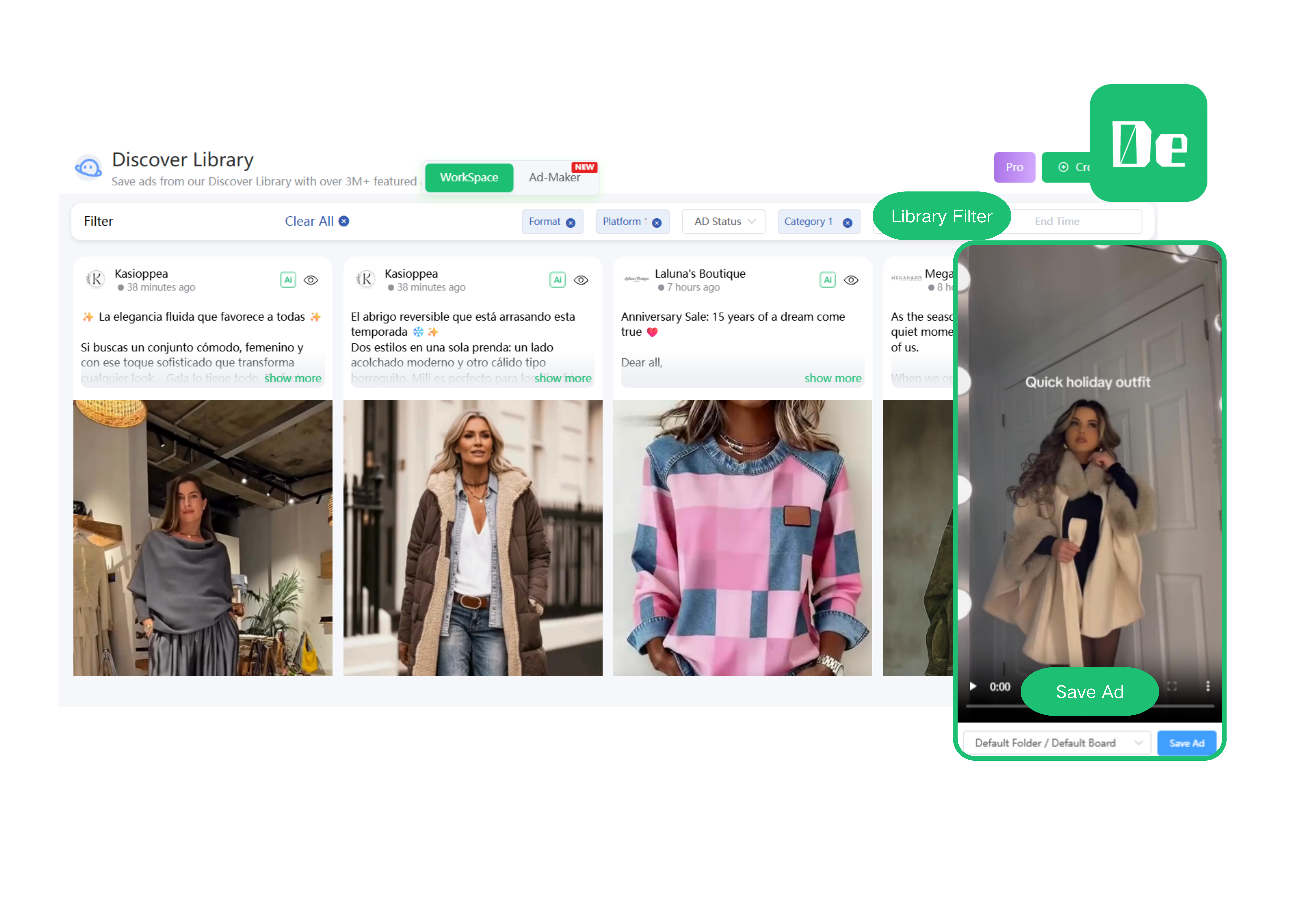
Use Denote Ad Library's filters to narrow down your search by Format, Platform, Ad Status, Category, or Time. This helps you quickly find the most relevant ads for your research, avoiding unnecessary scrolling and letting you focus on the campaigns that inspire you.

Click “Show More” to explore creative details
Once you find an ad, click Show More in Denote Ad Library to view its full creative details. You can see text, video, and even AI Analysis, giving you a deeper understanding of what makes the ad effective.

Save ads into organized folders
After reviewing, click Save Ad to store your selected creatives in the appropriate folder. Denote Ad Library keeps your saved ads structured, so you can easily revisit, compare, and use them later for reference or campaign planning.
Real Customers Reviews
What Our Users Are Saying About Denote Ad Library
FAQ
Frequently Asked Questions (FAQs)
Frequently Asked Questions (FAQs)
Here are FAQs (Frequently Asked Questions) for the Denote Ad Library:

Denote Ad Library lets you filter ads by platform, format, category, or time. You can easily explore content from different sources in one organized workspace.
Yes, Denote Ad Library allows you to save any ads into folders. This keeps your research organized and makes it simple to revisit inspiration later.
Denote Ad Library shows full ad details, including text, video, and AI analysis. This helps you understand what makes each ad effective.
Yes, you can filter ads by recent periods or specific dates. Denote Ad Library makes it easy to track trends and see how campaigns evolve over time.
Absolutely. Denote Ad Library lets you explore ads from different brands and industries, helping you spot patterns and competitive strategies.
Denote Ad Library supports browsing ads across multiple sectors. You can quickly find examples from various markets to inspire your own campaigns.
Start Exploring Ads with Denote Ad Library
Discover, filter, and save ads from multiple platforms in one place. Denote Ad Library helps you find creative inspiration quickly, analyze trends, and organize your favorite campaigns for easy reference.
Get Started
denote
Save ad videos from Facebook ad library and TikTok ads library, winning creative ad workflow with Denote AI.


