
To find best-selling products on a Shopify store, open a public collection and select Best selling if the store provides that sorting option. You can also try adding ?sort_by=best-selling to the collection URL. For the store's catalog, the usual starting point is /collections/all?sort_by=best-selling.
That gives you a product research shortlist. It does not reveal the store's exact sales, revenue, or most profitable product. The next useful step is to inspect the products near the top, then compare their offers and advertising.
The quick method
Replace the example domain below with the store you want to research:
https://example.com/collections/all?sort_by=best-selling
For a specific category, use its actual collection URL:
https://example.com/collections/travel-bags?sort_by=best-selling
Shopify documents best-selling as a supported collection sorting value in its sort_by reference. The collection handle must exist on the store; travel-bags above is an example, not a universal path.
If the URL already includes a query string, append &sort_by=best-selling instead. Replace an existing sort_by value rather than adding a second one. Check the page's selected sorting option and visible results after loading it. A parameter in the address bar alone does not prove that a customized storefront applied it.
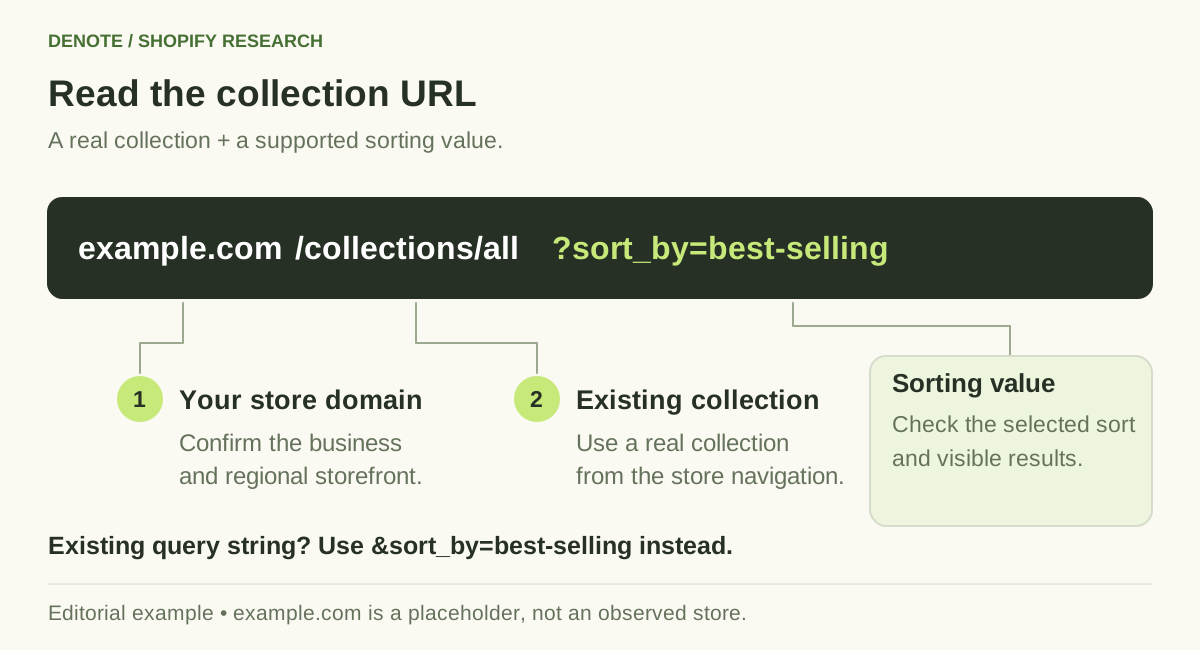
Use a real collection URL and confirm that the storefront applies the sorting option.
What Shopify's best-selling order actually means
Shopify's collection sorting documentation defines best-selling order using the all-time number of orders that include a product. If no products have sold, this option falls back to newest first.
Three practical consequences follow:
- It is not a recent-sales report. An established product can rank above a new launch that has recently attracted attention.
- It is not a revenue ranking. A frequently ordered accessory can appear ahead of a more expensive product.
- It is scoped to the collection. A high position in one category does not establish a high position across the whole business.
Even the catalog requires context. Shopify allows merchants to customize the All collection, including conditions that can exclude out-of-stock products. Record which collection you viewed and when.
A five-step product research workflow
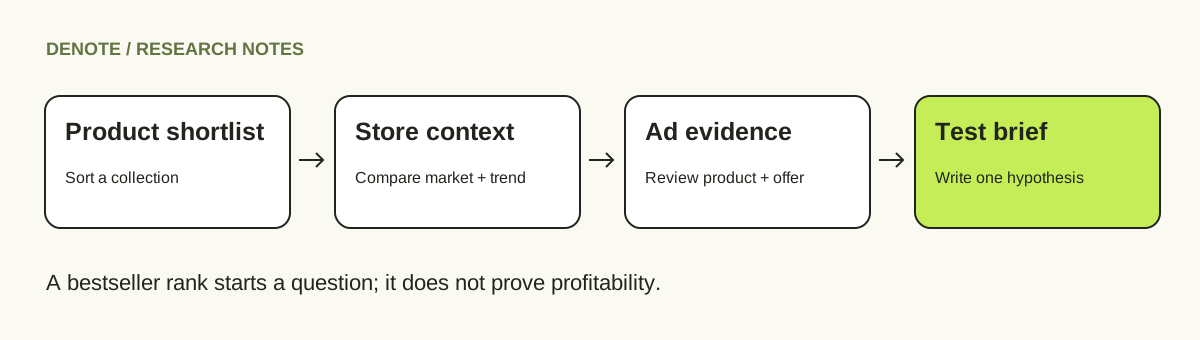
Editorial workflow: use a ranking to choose what to investigate, then build a specific test hypothesis.
1. Choose a store that competes for the same buyer
Start with a store selling to a similar customer, market, and price range. A premium luggage brand may be a useful creative reference for a travel-accessory seller, but its product ranking does not validate demand at the seller's price point.
Write down the domain, country or storefront market, currency, and category. Follow a known brand's official website or an ad's destination to confirm the store identity. Do not match businesses by name alone.
If you still need to select comparable stores, start with the Shopify competitor analysis guide.
2. Record a small, consistent shortlist
Take the first five products in the relevant collection as an initial working set. Five is an editorial starting point, not a statistically representative sample. Save each product URL, its position, the visible price, the selected variant, and the observation date.
Open the product pages. A collection card might show a starting price that applies only to the smallest size, or a sale price that changes when you select another variant. Note the offer a buyer would actually encounter.
Keep bundles, accessories, and standalone products separate. Comparing a two-pack against a single item without recording the pack size can make the apparent price difference meaningless.
3. Inspect the offer behind each product
For each candidate, answer four questions:
- What problem does the product claim to solve?
- What visible evidence supports that promise: a demonstration, materials, dimensions, or a clear use case?
- What is included in the offer: bundle, subscription, shipping threshold, or discount condition?
- What might stop a buyer: uncertain sizing, delivery time, difficult setup, or an unclear return policy?
This is where product research becomes more useful than copying a list. Two stores can sell similar items while presenting very different reasons to buy.
4. Connect the product to its ads
Identify the brand's advertising account and review ads that lead to the product or a related collection. Compare the opening, product demonstration, claim, offer, and destination page. Confirm the destination instead of assuming every ad from the brand promotes your candidate.
Use Denote to organize the research around the store. Its Shopify overview brings together store context, traffic estimates, and an advertising overview; the deeper ad analysis and Track Brand workflow help you continue investigating the brand's creative activity.
Keep the roles distinct: the public collection supplies the sorting evidence, while Denote supplies the store-and-ad research context. An ad's longevity, duplicate variations, or visible activity can justify closer inspection; none establishes product profitability.
5. Write one testable next step
Finish with a decision you can act on. For example: “Inspect whether this product's portability claim can be demonstrated clearly with our own product,” or “Compare the bundle offer against our shipping costs before considering this category.”
A good research note contains an observation, an interpretation, and a next action. It does not jump from “ranked first” to “guaranteed winner.”
Example: turning a shortlist into a decision
The following table is a fictional teaching example. The products, positions, and observations are illustrative, not measured store data.
| Candidate | Observed storefront clue | Advertising question | Next action |
|---|---|---|---|
| Packing cube set | First in the travel collection; sold as a set | Do ads demonstrate organization or emphasize the bundle price? | Compare the demonstration with our product's actual capacity |
| Travel pouch | Second; lower price than the set | Is it promoted alone or used as an add-on? | Check the destination and shipping threshold |
| Compression backpack | Third; multiple sizes | Does the creative show the same size and price as the landing page? | Record the advertised variant before comparing offers |
The backpack may deserve the most creative research even though it ranks third. That choice depends on your buyer, product, and economics—not on the position alone.
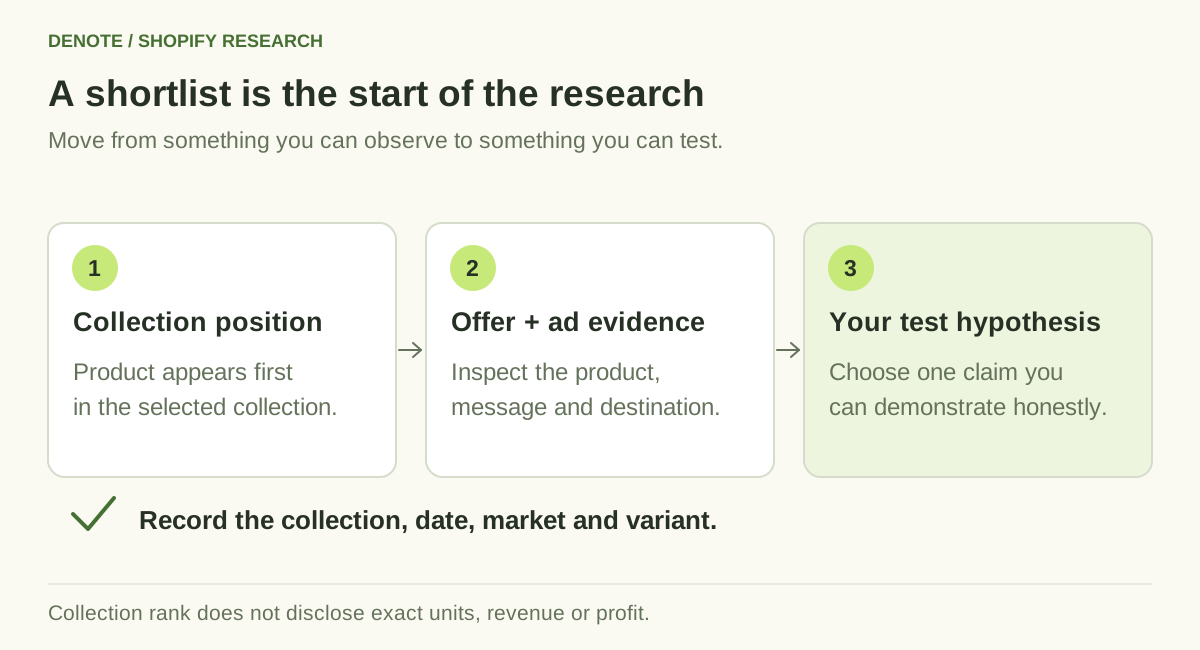
A collection position helps choose what to investigate; the product page and ads help shape the test.
What to do when the sorting method fails
The catalog URL returns an error. Use the store's navigation to find a real collection and try its sorting controls. A custom or headless storefront may not behave like a standard Shopify theme. Do not describe a failed request as evidence that the store has no sales.
The order appears unchanged. The collection may already use that order, or its display may be customized. Record that you could not confirm a change; do not assign your own sales ranking.
The collection is small or heavily curated. Broaden the research to another relevant collection, while retaining the collection label on each observation. Do not merge positions from different collections into one supposed storewide list.
A product is sold out. Availability can reflect demand, limited supply, a discontinued variant, or an operational issue. Treat it as a question to investigate, not a sales count.
For changes over time, use a Shopify store change log. Repeated, comparable observations are more informative than an isolated screenshot.
If you own the Shopify store
Use your own reporting access instead of inferring sales from the storefront. Shopify's sales reports support analysis by product and period. Choose the metric that matches your question: units, orders, or sales value, with returns and discounts considered appropriately.
Your own reporting can answer “What sold during this period?” A competitor's public assortment and ads answer a narrower question: “What is visible, and what should I investigate?”
Frequently asked questions
Can I see a competitor's exact Shopify sales for free?
The collection-sorting method shows an ordering, not an order ledger. It does not disclose exact units, revenue, profit, or conversion rates. Keep any third-party sales estimate labeled with its source, method, and period.
Does a best-selling product always make a good dropshipping product?
No. Supplier quality, delivery costs, returns, product differentiation, and your acquisition costs still matter. Use the shortlist to focus research, then check whether you can deliver a competitive offer.
How often should I check the list?
Choose a cadence based on the decision. Weekly observations can support ongoing research; an active launch or short promotion may need more frequent checks. Record the same collection and market each time, and acknowledge changes you could have missed between visits.
Take the shortlist into ad research
Choose one product, inspect its offer, and collect the ads that actually lead to it. Then use Denote Brand Tracking to continue researching the brand and turn useful creative references into a focused brief. A short, well-supported product hypothesis is more valuable than a long list of supposed winners.


