
Updated November 6, 2026.
Shopify competitor analysis means comparing stores that sell to similar customers, then using public evidence about their products, offers, traffic, and ads to inform your own decisions. Start with three relevant stores and one question you need to answer. A focused comparison is easier to act on than a spreadsheet full of unrelated brands.
For example: “How do travel accessory brands explain why a customer needs a packing cube set?” That question leads to product pages, demonstrations, bundles, and ad messages. It does not require guessing how much revenue every store makes.
This guide gives you a repeatable workflow and a worksheet you can use for your next product or creative review.
Decide what you want the research to change
Choose the decision before collecting data. Otherwise, attractive ads and large traffic estimates can pull your research away from the problem you started with.
| Your decision | Evidence to collect | Useful output |
|---|---|---|
| Which product deserves a closer look? | Collection position, product details, repeated promotion | Product shortlist |
| How should we present our offer? | Price, bundle, shipping terms, guarantee | Offer comparison |
| Which store is relevant to our market? | Category, price tier, country mix where available | Comparable store shortlist |
| What should our next ad explain? | Hook, demonstration, proof, offer, destination | Creative brief |
| What changed since last week? | Dated storefront observations and ad records | Research update |
Give the review a stopping point. A useful first pass might be three stores, three products per store, and a few ads that illustrate different arguments. Expand only when a specific unanswered question requires it.
Step 1: Build a shortlist of comparable stores
A store belongs on your shortlist because it competes for a similar customer or purchase decision. Shared use of Shopify alone is not enough.
Compare product category, likely use case, price range, market, and fulfillment promises. A premium travel organizer and a low-cost general merchandise store may sell similar objects but compete on different terms.
Record the exact storefront domain. Check regional domains and advertiser identities before combining records. A matching brand name is a starting point; product imagery, destination URLs, and business information help establish whether you are looking at the same business.
Keep one direct competitor, one adjacent brand, and one useful creative reference if that mix fits your question. Label their roles so that a strong ad reference is not mistaken for a direct market equivalent.
Step 2: Compare products and offers separately
For each store, choose a few products related to your decision. Record what the customer receives, the visible price and currency, variant differences, bundles, shipping conditions, and the main claim on the product page.
Then compare the offer. Two stores can sell similar products but frame them differently: one sells a single item, another sells a kit, and a third emphasizes a specific use case. These differences are often more useful for creative development than a simple price ranking.
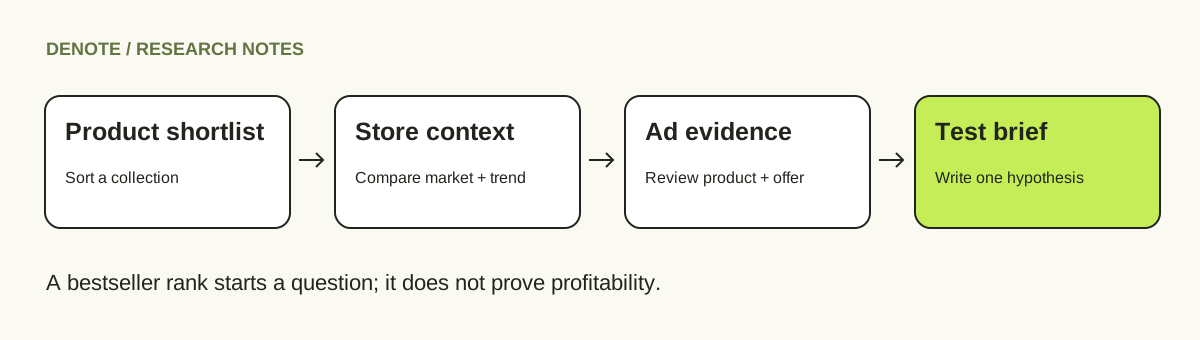
If a public collection supports best-selling sorting, use it as another way to choose products to inspect. Shopify's collection documentation describes this sort in terms of all-time orders that include the product. It does not provide a current-period unit-sales report to outside visitors. Follow the step-by-step guide to finding best-selling Shopify products for the method and its limits.
Do not record “sales increased” because a product moved up a collection. Record the observable change, the collection, and the date.
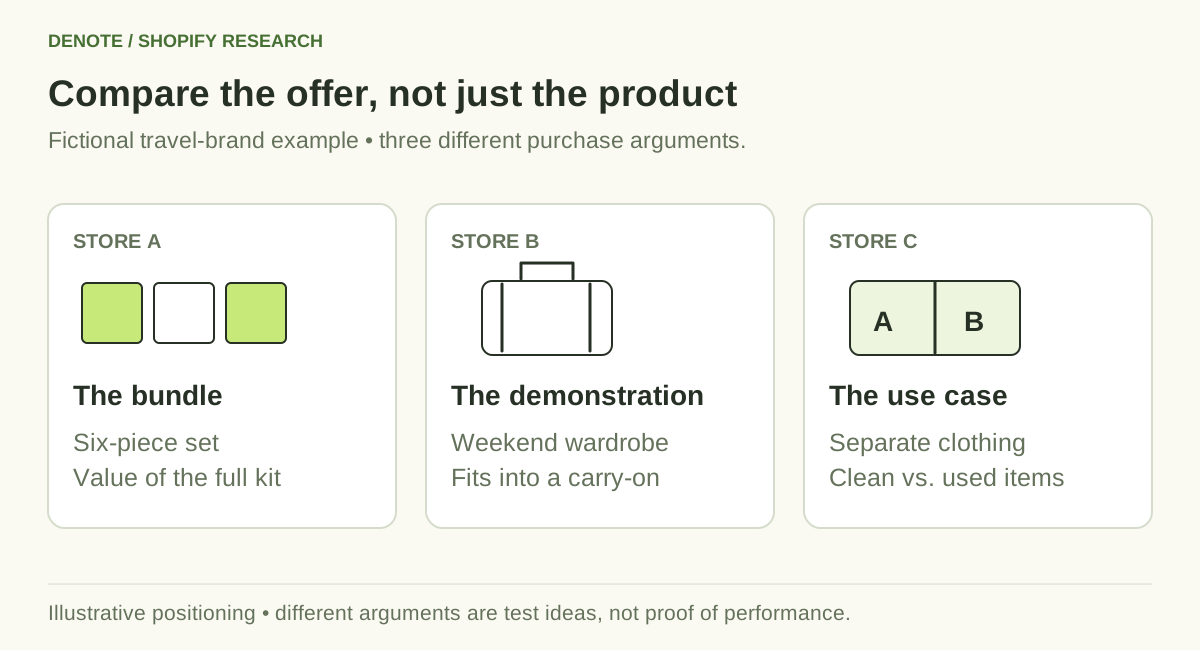
Fictional example: compare the purchase argument behind each offer, not just the product category.
Step 3: Use traffic to judge relevance and direction
Traffic estimates can help you prioritize stores and understand broad changes. Keep the provider, metric, month, geographic scope, and available history together.
Compare completed months from one source. Separate estimated total visits from organic search traffic, and do not treat visits as unique customers or orders. A missing estimate is missing coverage, not evidence that a store has no audience.
Country distribution can also change your interpretation. A smaller store that reaches your market and sells at a comparable price may be more relevant than a larger store serving a different region.
Use the Shopify store traffic guide when you need a consistent worksheet for these figures. The purpose is to decide where to investigate, not to reverse-engineer a competitor's profit from an assumed conversion rate.
Step 4: Follow each ad to its product page
An ad becomes more useful when you know what it asks the viewer to buy. Save the destination along with the creative and record five things:
- Opening argument: What problem, desire, or situation appears first?
- Product demonstration: What does the viewer see the product do?
- Proof: What supports the claim within the ad or landing page?
- Offer: What bundle, price, incentive, or condition is presented?
- Destination: Does the landing page continue the same promise?
For a travel organizer, “pack more” and “find everything quickly” are different arguments. Save examples under the argument they make, then look for gaps you could test with your own product.
Repeated appearances and long-running ads are research signals. They do not establish CTR, ROAS, spend, or profitability. Public ad availability also depends on the platform and the tool's coverage. Keep claims about performance separate from what you can directly observe.
For a more detailed creative review, use the ad creative analysis worksheet.
Step 5: Connect the store research in Denote
Use Denote's Shopify store overview to bring the store's basic information, available traffic history, top countries, and advertising context into the same research workflow. Check that the advertiser matches the store before drawing conclusions from its ad activity.
From there, inspect the relevant ads and landing pages, save examples for your creative review, and use Track Brand to revisit the brand's advertising. Available ad counts and trends reflect the covered data; they are not a complete record of every campaign the business has ever run.
Keep the product and price observations in your worksheet. The store overview gives those observations context; a public price change and an advertising change remain separate observations until you have evidence connecting them.
Which tools belong in a Shopify competitor workflow?
Choose tools by the evidence you need. These are task-based options, not a ranking based on a paid-product benchmark. The descriptions below draw on public product information checked November 6, 2026, and the Denote workflow described here.
| Tool or source | Useful role | What to check before relying on it |
|---|---|---|
| Denote | Connect store context, ad research, saved examples, and brand tracking | Store-to-advertiser match and available coverage |
| Koala Inspector | Inspect a Shopify storefront's product and technology context | Which fields are detected and which are estimated |
| Similarweb | Review traffic estimates, trends, and geography | Site coverage, period, and metric definition |
| Semrush | Investigate search visibility and related competitive context | Whether the report covers organic search or broader traffic |
| Meta Ad Library | Look up public ads on Meta | Advertiser identity, region, and availability |
| The storefront itself | Read current products, offers, and landing pages | Currency, variant, date, and personalized conditions |
A tool can be useful for one task without replacing the others. Inspect a few stores you already know before deciding whether its coverage fits your workflow.
Copy this competitor analysis worksheet
Use one row per store-product combination when the offer or destination differs. Keep the dated source links in your private research notes.
| Field | What to record |
|---|---|
| Research question | The decision this comparison should support |
| Store and domain | Exact storefront and market |
| Product and variant | Product URL, selected variant, main use case |
| Offer | Price, currency, bundle, shipping conditions |
| Collection observation | Collection URL, sort mode, position, date |
| Traffic context | Provider, metric, completed month, available history |
| Ad evidence | Advertiser, creative, observation date, destination |
| Message | Opening argument, demonstration, proof, offer |
| Uncertainty | Missing coverage or an unverified interpretation |
| Next action | One test or follow-up question |
Keep an observation column and an interpretation column if several people contribute. “Three reviewed ads demonstrate suitcase packing” is an observation. “This may reduce uncertainty about capacity” is an interpretation to test.
Example: turn the research into a creative brief
Suppose your fictional travel brand reviews three comparable stores. One emphasizes a six-piece bundle, one demonstrates fitting a weekend wardrobe into a carry-on, and one focuses on separating clean and used clothing.
Your product is a small organizer set. The useful takeaway is not to copy the largest bundle or claim a rival has the best conversion rate. It is to test a clear use case that your product can demonstrate honestly.
A practical brief could be:
- Audience: Travelers packing a carry-on for a weekend.
- Opening: Show the scattered items before packing.
- Demonstration: Put the same items into the organizer set and suitcase.
- Proof: Keep the demonstration visible and avoid unsupported capacity claims.
- Offer: Present your actual set and current terms.
- Measurement: Compare the new creative with your existing baseline using your own campaign data.
The competitor research supplies a hypothesis. Your test supplies the performance evidence.
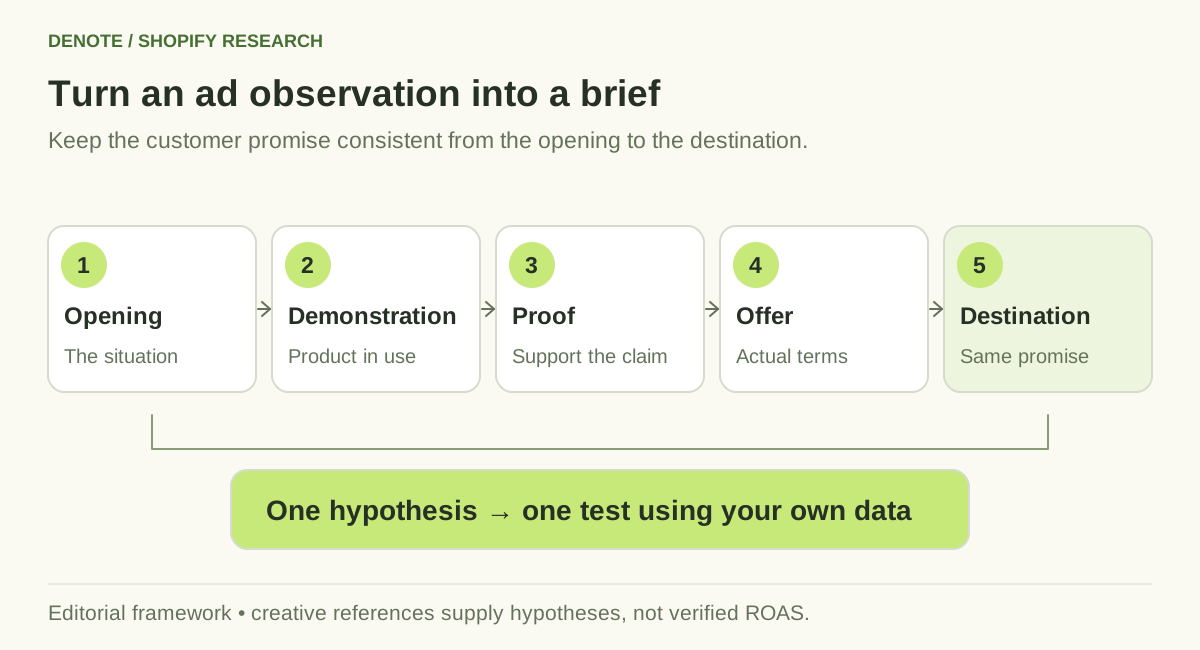
Keep the promise consistent from the first frame to the landing page, then test with your own data.
Keep the comparison current
Review storefront changes on a cadence that matches your campaign planning. Record new products, price changes, bundles, and visible availability with dates. Review traffic when a new comparable reporting period becomes available.
The Shopify store change tracking guide includes a simple before-and-after log. If you are selecting a broader research stack, compare the Trendtrack alternatives by the job you need each tool to do.
Frequently asked questions
Can I see a competitor's exact Shopify sales?
Not from its public storefront alone. Collection sorting, traffic estimates, and visible ads do not expose its private order records. Treat third-party revenue figures according to their disclosed estimation method.
What is the best Shopify competitor analysis tool?
Choose based on the decision. Traffic research, storefront inspection, search visibility, and creative research need different evidence. Test coverage on relevant stores before choosing a subscription.
How many competitors should I analyze?
Start with three relevant stores and a focused question. Add more when the initial comparison cannot answer it or when you need a different market or price segment.
What should I do after the analysis?
Write one testable product, offer, or creative hypothesis. Save the evidence behind it and define how you will measure the result. Use Denote to keep the advertising references connected to your next creative review.


