
To track a Shopify store's changes, establish a dated baseline, revisit the same products and pages under the same conditions, and record what changed. Cover three areas: the assortment, the offer, and the advertising. A useful Shopify store tracker should help you answer what deserves attention, not simply display more numbers.
Start with one competitor and a small set of products. Keep product URLs, variants, currency, source, and observation time in the log. Connect storefront changes to ad research, while treating the relationship as a hypothesis until you have evidence.
What should you track?
| Area | Record | Why it matters | What it does not prove |
|---|---|---|---|
| Products | Newly observed items, unavailable items, collection membership | Reveals changes in the visible assortment | A newly observed item was necessarily launched that day |
| Prices | Product, variant, displayed price, currency | Makes a price comparison reproducible | A lower price caused more purchases |
| Offers | Bundles, discount conditions, delivery promises | Shows how the buying proposition changes | A displayed discount was used by every customer |
| Ads | Advertiser, ad reference, status, observed creative and destination | Reveals changes in the visible message | More ads mean higher revenue or spend |
| Landing pages | Headline, proof, offer, product destination | Shows how the ad-to-page experience changes | The page has a higher conversion rate |
| Traffic | Source, metric, completed month, market | Adds context to the store's apparent direction | The traffic movement came from a particular ad |
Choose fields that support a decision you actually make. A creative strategist may care most about new demonstrations and offers. A merchandising team may prioritize product availability and price. Neither needs to track every visible field every day.
Step 1: define the store and the research question
Confirm the domain and the brand behind it. Record country-specific storefronts separately when their currencies, products, or offers differ. Match the store to the correct advertiser before comparing its ads.
Then write a question narrow enough to answer, such as:
- Is this competitor introducing more bundles in our product category?
- Are new ads leading to the same product or a different landing page?
- Does the visible offer change between a launch and a promotion?
Avoid a vague goal like “find out if they are winning.” You cannot directly observe a competitor's margin, attribution, or full order history from a public storefront.
Step 2: create the baseline before calling anything new
On the first visit, record the current state. Save the URLs and the relevant visible information with a timestamp. Include the collection, selected variant, market, currency, and any obvious filter conditions.
The first observation is a baseline, not a list of new launches. If you first encounter a product today, label it first observed today unless a reliable source establishes its launch date.
Shopify's collection sorting options include creation-based and best-selling orders. These views can help you browse consistently, but creation order is not proof of the date a product became available to every customer. See the best-selling products workflow for how to interpret collection positions.
Step 3: compare like with like
For product prices, revisit the same variant and market. Record whether a number is a current price, a comparison price, a subscription offer, or a minimum shown on a collection card.
For availability, distinguish “this size is unavailable” from “the product is unavailable.” For a missing page, note whether you saw a redirect, an error, or a removal from navigation. A page temporarily failing to load is not enough to classify a product as discontinued.
For ads, retain the advertiser and ad reference. A revised thumbnail, a different country filter, or a newly visible placement can change the result set without establishing a new campaign.
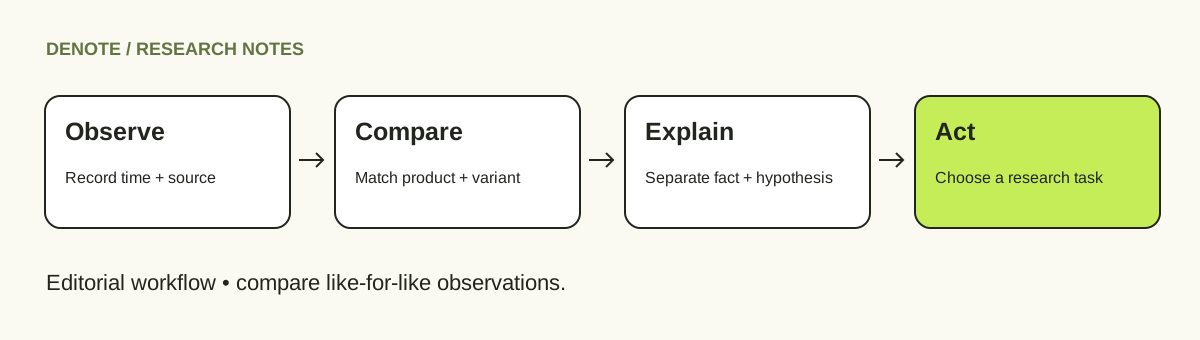
Editorial process: preserve the observation before deciding what it might mean.
Step 4: use a change log with separate evidence and interpretation
The log below is a fictional example. Its dates, prices, and products illustrate the method and are not observations of a real store.
| Observation | Before | After | Interpretation to investigate | Next action |
|---|---|---|---|---|
| Nov 2: travel pouch, blue variant, US storefront | $29 on Oct 26 | $24, same variant and currency | A temporary offer or a new regular price | Record discount conditions and check again |
| Nov 2: packing collection | No cube set in the recorded view | Cube set now visible | Newly added to this collection; launch date unknown | Open the product and find related ads |
| Nov 4: brand ad review | Recorded ad led to the homepage | Newly observed ad leads to a bundle page | More specific product messaging | Compare the ad promise with the bundle page |
For the illustrative price change, (24 − 29) ÷ 29 × 100 is approximately −17.2%. That is a change in the observed price, not a change in sales. Keep the original numbers next to any calculated percentage.
If a field cannot be checked, use “not observed” or “unavailable.” A missing value should not silently become zero.
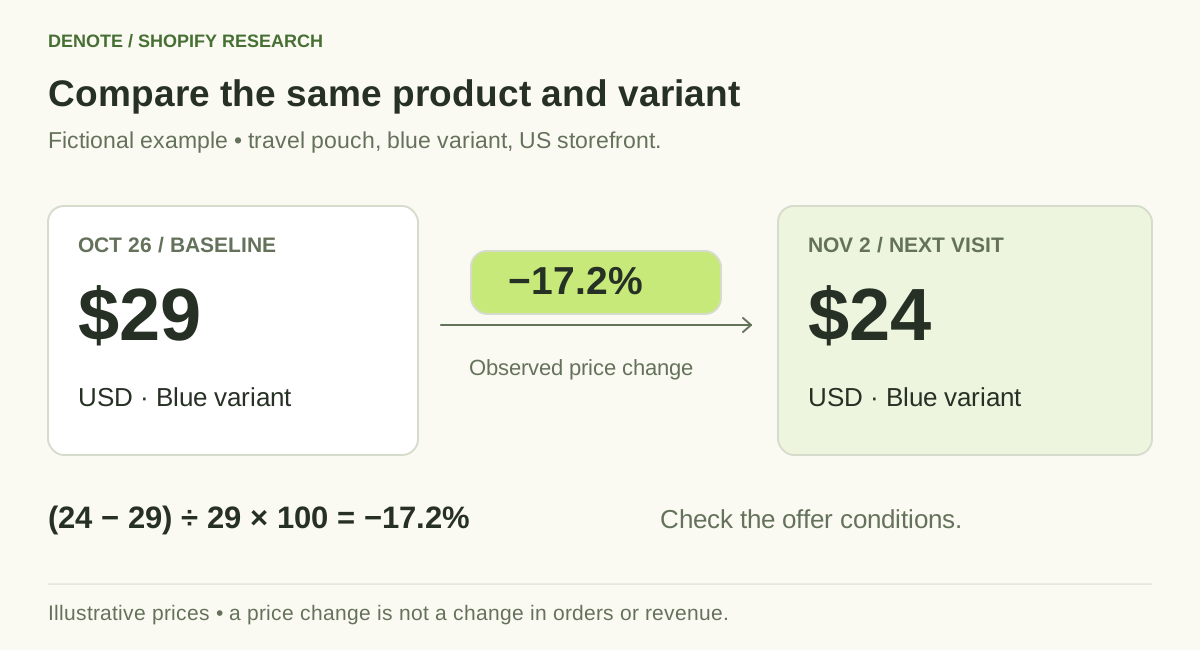
Fictional example: compare the same variant, currency and market before calculating a price change.
Step 5: connect Shopify store changes to Denote's ad workflow
Denote connects a Shopify store overview with deeper advertising research. Use the overview to establish the store's identity, available traffic context, and visible ad activity, then move into the corresponding brand analysis.
In the Track Brand workflow, examine the ads and landing pages associated with the brand. Keep useful creative references together so the next review begins with the same research question. Record the available date range and coverage whenever you compare activity.
Use your storefront log alongside that analysis:
- Find a meaningful product or offer change on the store.
- Inspect ads leading to that product or related page.
- Compare the message, demonstration, offer, and destination with the earlier reference.
- Save a useful reference and write the question it raises for your team.
This division matters. Brand ad research and catalog monitoring are different jobs. Do not assume an advertising view records every price or stock change. Keep those storefront observations in the log unless the specific product-monitoring capability is available and its coverage is clear.
How often should you monitor a Shopify competitor?
Use a cadence that matches how quickly you can respond. The following is an editorial starting point, not a promised tool refresh interval.
| Research task | Suggested review rhythm | Practical limitation |
|---|---|---|
| General competitor research | Weekly | Short promotions may begin and end between visits |
| Active launch or promotion | Daily while relevant | Your observation time still differs from the actual change time |
| Traffic direction | After each new completed monthly report | A monthly estimate cannot pinpoint a daily event |
| Creative planning | Before the next brief, plus a regular brand review | An interesting creative is not automatically suitable for your product |
Automated monitoring has its own collection schedule, failures, and gaps. Check the actual product's freshness information instead of treating your review cadence as a collection guarantee. A first-time brand analysis may also need time to assemble results.
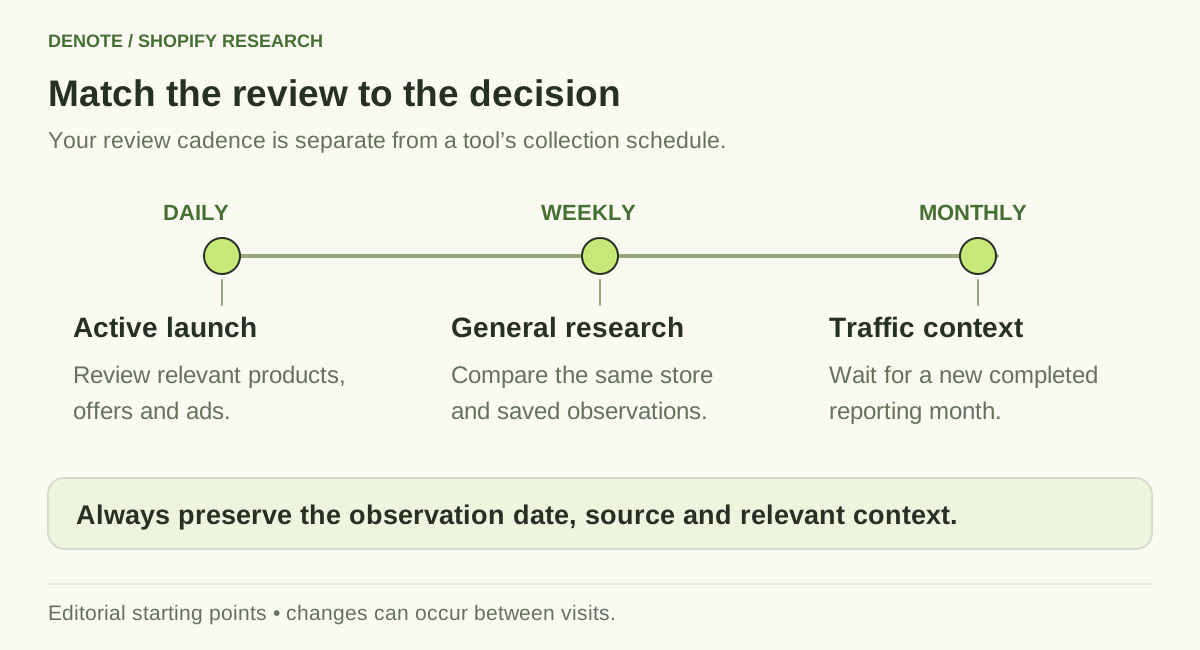
Choose a review cadence that fits your decision and the source reporting period.
Decide what deserves action
Not every change needs a response. Use these three categories:
Investigate now: the competitor changes a directly comparable offer, introduces a relevant product, or starts using a noticeably different demonstration. Open the evidence and assign a specific research task.
Watch: an isolated change could be temporary, localized, or caused by a variant selection. Preserve it and check the same context again.
Ignore for this task: the change affects an unrelated country, product category, or buyer. Record why it is out of scope rather than treating all activity as a threat.
A bundle launch might justify testing clearer bundle messaging. It does not automatically justify matching the competitor's discount. Your fulfillment costs and product economics remain part of the decision.
Common monitoring mistakes
- Equating more ads with more spending. Ad counts do not reveal the budget allocated to each ad.
- Calling missing ads “stopped.” Check the platform, filters, coverage, and collection state first.
- Calling a first observation a launch. Keep discovery time separate from publication or release time.
- Mixing global and local storefronts. Currency, shipping, and assortment can differ.
- Attributing a monthly traffic rise to one creative. Several channels and events could explain the movement.
Use the Shopify traffic guide when you need to compare the store's broader direction with its visible advertising.
Frequently asked questions
Can I track Shopify store changes for free?
You can maintain a small manual log using public pages and available ad-library results. The cost is your time and the changes you miss between checks. Paid tools should be evaluated on the coverage, history, and repeated work they actually remove.
Can a store tracker tell me exact competitor sales?
A record of products, prices, availability, or ads does not itself reveal exact sales. If a tool supplies a sales estimate, inspect its methodology and label it separately from observed storefront changes.
What should I save after each review?
Save the source URL, time, relevant context, old and new values, and one next action. If using a screenshot, include enough context to identify the product, variant, and offer. Avoid an isolated crop that cannot be traced back to its source.
Build a monitoring routine you will use
Begin with one store, one category, and one question. Keep the observation log small enough to review consistently, then continue the advertising research in Denote Brand Tracking. The useful outcome is a better research or creative decision, not a larger collection of alerts.


