
If Facebook Ad Library is not showing ads, first check the advertiser Page, selected country, ad category and filters. Then distinguish an empty search from a page that failed to load. “No ads match” describes the current search; it does not establish that a business has stopped advertising.
Start at Meta Ad Library, choose your research market deliberately, and remove optional filters before searching the advertiser again. If you have a Library ID link, open it separately and compare the visible settings.
TL;DR
- Confirm the actual advertiser Page before interpreting a brand-name search.
- Keep country and ad category visible; broaden one optional filter at a time.
- A recently launched ad may not yet be listed. Meta describes an update window tied to first impressions and later changes.
- Treat an unavailable historical ad, an empty result and a loading error as different problems.
- Record what you could see, with the date and settings. Leave the advertiser's spend and delivery conclusions unresolved.
Identify which problem you have
| What you see | First check | What you can conclude |
|---|---|---|
| The advertiser is missing from suggestions | Page name, spelling and regional identity | The name search did not identify the Page |
| The Page appears but its list is empty | Country, category and optional filters | No records were returned within that scope |
| A saved ad link opens but the Page list is empty | Compare the link's state with the list's country/settings | Direct and list views can differ |
| The page is blank or keeps loading | Reload once and try an ordinary clean browser session | There may be a loading or session problem |
| An old Library ID no longer opens | Date, category and applicable archive coverage | That source is unavailable now; the reason may remain unknown |
This guide addresses the public library. If the question is whether your own campaign is spending or delivering, check the correct account in Ads Manager. An absent public result cannot replace your account's delivery records.
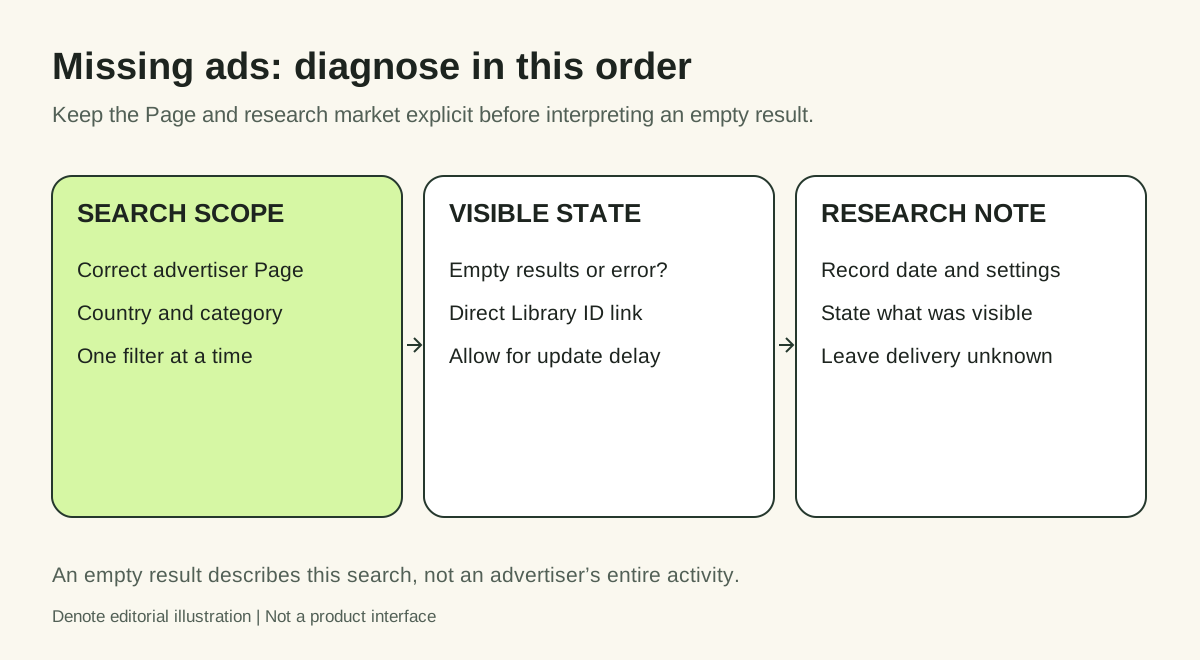
Editorial illustration of the troubleshooting sequence; not a Meta interface screenshot.
1. Confirm the advertiser, not just the brand word
A keyword result can mix a brand's own ads with resellers, affiliates or unrelated businesses. Search the recognizable brand name, then inspect the Page identity and its website. For organizations with several regional Pages, choose the one associated with the market you are researching.
If you know the advertiser's official Facebook Page, use that identity to find its Library presence. Do not assume the first suggestion or a familiar logo establishes ownership. Record the Page name and Page ID when available so another researcher can repeat the search.
For a complete discovery workflow, use our guide to finding competitors' Facebook ads. Return here if the expected records still do not appear.
2. Reset optional filters while preserving your question
Choose the country you actually want to research. For ordinary commercial creative research, select All ads, then start with the broadest relevant media and platform settings. Check whether a date or status filter is narrowing the results.
Change one condition, observe the result, and write down the change. For example, move from video-only to all media before changing the market. If you change country, format and date simultaneously, you lose the ability to explain why the list changed.
A useful sequence is:
- Keep the advertiser identity fixed.
- Confirm country and ad category.
- Remove optional media, platform, language and date restrictions where present.
- Run the search again.
- Reapply only the restrictions your research question needs.
Controls can vary with region and category. If a particular filter is absent, record that limitation rather than following instructions written for a different view.
3. Account for new ads and recent edits
Meta's Ad Library homepage says new ads are added within 24 hours of their first impression and that updates can take up to 24 hours to appear. The relevant starting point is the first impression, rather than merely creating or approving an ad.
If this is your own campaign, compare that timing with the first actual delivery shown in your account. Revisit the public record after the stated window. If the mismatch persists, retain the ad ID, Page, market, observation time and exact error for support.
That timing statement does not explain every missing result. It is one condition to check alongside identity and scope.
A real example: an empty list and an accessible ad
During a manual review on November 13, 2026, a United States keyword search for Allbirds returned an active ad with Library ID 4575393946018892. Opening its direct Library link subsequently produced a view with China selected in the background Page list. That list showed no matching ads, while the direct-link dialog still displayed the active ad.
The observed facts are limited: the selected-country list was empty and the direct record was accessible in the same browser view. This does not establish that the ad was delivered in China, that all Allbirds ads were visible, or that a market restriction was the only explanation.
The practical lesson is to compare settings before treating an empty list as a company-level finding. A direct-link dialog and a filtered Page list are different views of the source.
4. Separate historical coverage from a broken search
The ordinary current-ad view is not an unrestricted archive of everything a business has ever run. Meta describes additional historical coverage for specified regions and ad categories on its Library homepage.
An inactive status option, where available, does not guarantee that every stopped commercial ad is retrievable. An old link can also become unavailable. Write “not accessible on this date” rather than “failed campaign” or “advertiser deleted the evidence.”
If you previously saved a reference, inspect what the saved record actually contains. Keep the original source URL, ID and capture date even if you can still view a copy. A screenshot or saved video alone cannot establish current delivery status.
5. Diagnose loading problems separately
If the interface itself will not render, note the exact symptom before changing anything. Reload once. Then compare the same public URL in an ordinary clean browser session, with optional content-blocking extensions paused for that page if appropriate.
Do not promise that clearing cookies, switching browsers or disabling an extension will fix a Meta-side problem. These steps help distinguish a local session issue from a repeatable source problem. Avoid repeated refresh loops; they do not add evidence.
If Meta displays an access restriction or verification request, use its normal process. A different research tool is not a way around that restriction. It can only provide a separately scoped source of references.
Keep research moving without inventing the missing record
Denote provides another route into creative research through Denote Ad Library. If you use it while the public source is unavailable, label the source and observation date separately. A Denote record does not establish that the same ad is currently visible in Meta's public list.
Login and available actions depend on the destination and your account. During this review, deeper exploration from the public Top Ads view led to a login screen. Do not assume that opening a public preview gives access to every detail or saving feature.
Keep a small diagnostic note:
| Field | What to record |
|---|---|
| Research target | Actual Page and intended market |
| Source | Meta list, direct Library link or another named source |
| Settings | Country, category and applied filters |
| Observation | Empty list, accessible ID, loading error or unavailable link |
| Next action | Recheck scope, allow for timing, or investigate source availability |
FAQ
Why can I see an ad in my feed but not in Ad Library?
Start by identifying the advertiser shown on that ad, its Page and the relevant market. Check the timing of first delivery and the Library filters. A feed impression and a filtered search are different observations; keep the direct ad information if available.
Does no result mean my competitor stopped spending?
No. You have established only that the current search returned no result. Actual spend is a separate fact requiring appropriate evidence.
Can Denote recover every missing or inactive ad?
Do not assume complete historical coverage or guaranteed recovery. Inspect the available record and describe its source, capture date and limitations.
What should I do after ads reappear?
Save the source identity and settings, then inspect the creative. If a card contains several variants, the multiple-versions guide explains how to log them without inflating your concept count. Your next useful output is a clear research note, not a guess about a competitor's results.


