
Facebook Ad Library's “multiple versions” label means the ad has variations associated with it. Open the ad's details to inspect the versions the interface exposes. A single preview does not establish that you have seen every variation, and the label does not reveal which one performed best.
For creative research, keep three counts separate: Library records, visible versions and distinct creative concepts. That distinction stops a busy advertiser's variations from looking like dozens of unrelated ideas.
TL;DR
- Open the details before counting or saving a multi-version ad.
- Keep the source Library ID attached to each inspected variation.
- Record what changed: visual, opening, primary text, headline, offer or destination.
- Group by message and execution for your research task; document your grouping rule.
- Version count, active status and repeated assets do not establish budget, controlled tests or profitability.
What the label tells you—and what it leaves open
The useful fact is that the public record has more than one version. You still need to inspect the available views to learn what differs. A variation might matter substantially to your brief, or it might preserve the same message in a slightly different execution.
Avoid reconstructing the advertiser's Ads Manager setup from this label. It does not by itself establish the campaign structure, audience split, automation settings or the decision process behind the creative. Several possible production and delivery setups can produce visually similar public evidence.
Use the Meta Ad Library record as your source, and write your own interpretation in a separate field.
| Observation | Useful research question | Unsupported conclusion |
|---|---|---|
| Multiple-version label on one record | Which visible elements change? | The advertiser ran a controlled A/B test |
| Similar visuals under different Library IDs | Are these the same execution in different records? | Each record represents a new concept |
| Several ads repeat a message | How consistently is the message presented? | That message has the highest ROAS |
| A version is not accessible in your current view | What did you actually inspect? | The missing version was paused for poor results |
A real Allbirds record: what was actually visible
On November 13, 2026, a manual Allbirds search in Meta Ad Library, with United States, All ads and Active selected, returned Library ID 4575393946018892. The card promoted a grey wool shoe with a seasonal price offer and carried the multiple-versions label.
Opening the ad's direct record and its details exposed a 1/2 version indicator. The inspected state included a video player showing an 18-second duration. The first visible preview showed a person wearing a light shirt and dark trousers; the primary text combined product identity, a discount and urgency.
Those observations establish a concrete starting point for a research log. They do not establish what the second version contains: it was not inspected for this example. Nor do they reveal which version received more delivery, clicks or purchases. The price is a historical advertiser claim visible on that date, not a current shopping recommendation.
A careful record would therefore say: “Two versions indicated; first visible state inspected; second version unresolved.” That is more useful to a teammate than marking the ad “fully analyzed.”
How to inspect a multi-version ad
1. Fix the source and scope
Record the advertiser Page, Library ID, country, status and observation date. If you started with a keyword search, confirm that the advertiser is the intended business before comparing its creative.
For the earlier steps, see how to find competitors' Facebook ads. If a direct link and a filtered list disagree, use the missing-ads troubleshooting guide before assuming the record disappeared.
2. Open details and inspect the available navigation
Use the ad's details control. Look for version navigation or a counter, and move through the available versions when the interface permits. Labels and layouts vary; document the view you actually used.
For each accessible version, note the first visible frame or image, opening copy, headline, offer and destination. Watch the video when motion or sequencing matters. A poster is evidence of that poster, rather than proof of the full hook, pacing or ending.
If a version fails to load, leave its contents unresolved. Do not fill the gap using a similar-looking ad elsewhere.
3. Write the difference before naming a concept
Describe a change concretely: “The opening now demonstrates the product before the offer appears,” or “The visual stays the same while the headline changes the use case.” Avoid vague notes such as “better version.”
Then decide whether the change affects the message, the execution, or both. Your concept grouping is an editorial analysis, not a classification supplied by Meta.
4. Preserve the relationship between source and version
Give each inspected version a local reference such as A-v1 or A-v2, while retaining the original Library ID. Your suffix identifies a research note; it is not a new Meta ad ID.
If you save a reference using Denote, inspect the resulting saved record before assuming it includes every variation. Access and saving actions can depend on login and plan. Keep the version-specific notes alongside the reference when the available workflow supports them, or use a separate research log.
A log that does not inflate the concept count
The table below is a fictional example. It demonstrates a grouping method; it does not describe the unseen Allbirds version or an actual experiment.
| Source record | Local reference | Visible difference | Research grouping |
|---|---|---|---|
| Example ID A | A-v1 | Product shown, then an everyday-use promise | Concept: everyday convenience; product-led execution |
| Example ID A | A-v2 | Person demonstrates the same use case | Same concept; demonstration execution |
| Example ID B | B-v1 | Different headline addresses a specific objection | Separate message hypothesis |
This sample has two source records, three logged versions and two editorial message groups. The two counts alone cannot tell you whether the advertiser considers these separate tests.
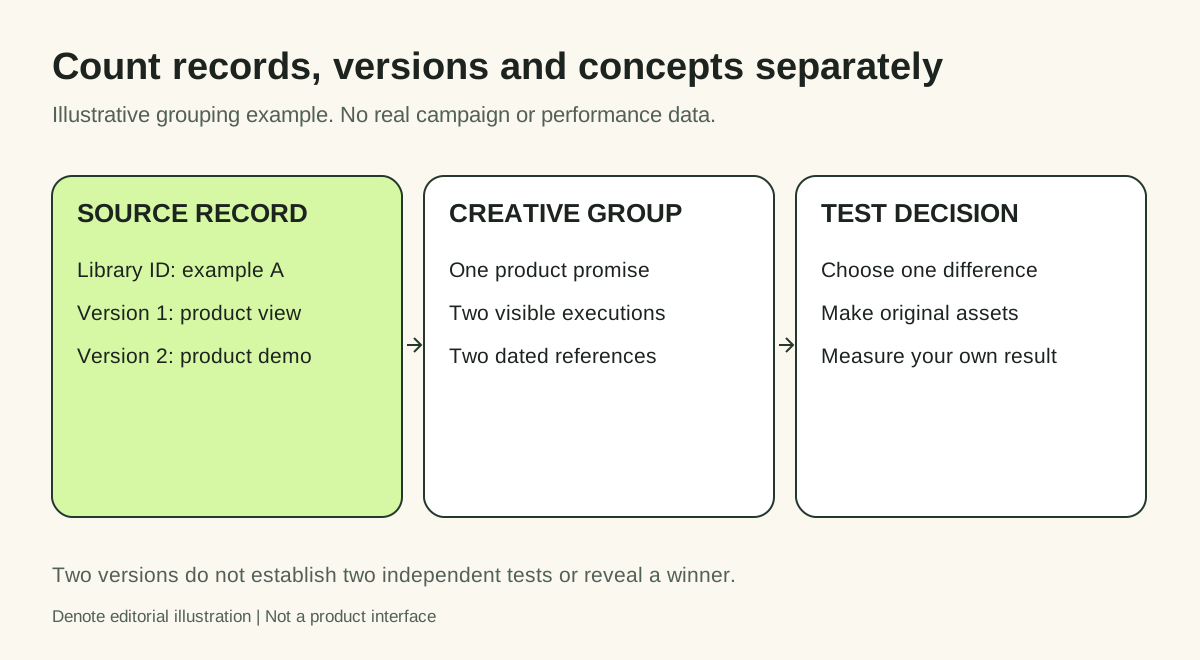
Editorial illustration with fictional records. It is not a Meta screenshot or a reconstruction of Allbirds' second version.
For broader comparison, use an ad creative analysis worksheet. Keep the grouping rule consistent: if you classify by promise in one review and by format in the next, your concept counts will not be comparable.
How to handle repeated creative under different IDs
Keep both source records when they matter to identity or observation history. Add a shared creative-group label only after comparing the actual content.
Compare the media, message, offer and destination rather than relying on matching thumbnails. A reused first frame can conceal different videos. Conversely, different crops can present the same idea. Note whether you inspected the complete asset or only the preview.
When reporting your findings, specify the unit: “six records inspected” is different from “six distinct concepts.” Neither is a count of the competitor's campaigns, audiences or tests.
Turn one difference into a testable brief
Choose a variation your team can reproduce with original work. For instance, if two inspected executions communicate the same benefit in different ways, test whether showing your own product performing that task makes the promise clearer.
Write down:
- Observation: the specific difference you saw.
- Hypothesis: why that difference might matter to your audience.
- Production change: the original asset or copy you will create.
- Control and outcome: what you will compare and measure in your own campaign.
A useful next step is the creative testing guide. The public reference informs the hypothesis; your account and business data determine the result.
FAQ
Does multiple versions mean the ad is winning?
No. It identifies variation, without providing the cost and business outcomes needed to establish a winner.
Is one version the same as one campaign or ad set?
No. Treat the public version as a creative observation. Do not map it to campaign or ad-set structure without separate evidence.
Why can I see only one preview?
Open the details and inspect the available navigation. If other versions remain inaccessible, record the limitation. Do not assume the first card is a complete archive of what people saw.
Where should I organize the research?
Use a dated log tied to source IDs. Denote Ad Library is a starting point for collecting research references; inspect what your account can access and save. The useful result is a small set of explainable creative differences that can inform original work.


