
Most advertisers approach Facebook keywords the wrong way. They try to map Google's search query logic onto a platform that was never built that way, and then wonder why their targeting feels like guessing.
Here's the shift that changes everything: Facebook keywords aren't about what users type. They're about what advertisers have already paid to say. And the Ad Library is sitting right there, full of competitor campaigns that have survived real budget pressure. Those campaigns are your most reliable keyword research source, because they're not guesses. They're validated.
This guide walks you through a repeatable system to extract winning keywords from competitor ads in the Ad Library, turn them into targeting clusters and ad copy, and save the research so it compounds over time instead of disappearing into a folder of expired screenshot links.
What "Keywords" Actually Mean on Facebook
Facebook keywords are not search queries: they're intent signals
On Google, keywords are what users type. On Facebook, there's no search bar in the feed, so what does "keyword" even mean?
The answer is: intent signals. When you enter a word like "fitness" or "skincare" into Facebook's Detailed Targeting, you're not matching a search query. You're telling Meta's algorithm to find people whose behavior, app usage, page interactions, and content engagement patterns match that interest cluster. The keyword becomes a proxy for a type of person.
This distinction matters because it changes how you do research. On Google, you're trying to match what someone will type tomorrow. On Facebook, you're trying to figure out what language already resonates with a specific type of person, and the Ad Library gives you real evidence of what's working right now.
Where keywords show up across your campaign
Facebook keywords appear in more places than most advertisers realize. Understanding where gives you more leverage at every stage:
When your targeting keywords, your headline, and your body copy are all aligned around the same intent, Facebook's relevance signals improve, which typically lowers your CPM and improves delivery.
What you control vs. what Meta controls
One of the most common misconceptions is treating Facebook like a keyword bidding system. It isn't. Here's the clear boundary:
One of the most common misconceptions is treating Facebook like a keyword bidding system. It isn't. Here's the clear boundary:
- You control: the interest terms you enter, the copy language you write, how you structure and separate ad sets, which audiences you exclude.
- Meta controls: which specific users within your defined pool actually see your ad, when they see it, and at what frequency.
This means keyword research on Facebook is really about two things: finding the right interest terms to define your audience pool, and finding the right language to resonate with that pool once they see your ad. The Ad Library helps with both.
Why the Ad Library Is the Best Free Keyword Research Tool
The Ad Library shows you validated keywords, not guesses
Every tool that generates keyword suggestions, whether it's Ads Manager's targeting search, third-party interest finders, or general keyword research platforms, gives you hypotheses. They tell you what might work based on search volume, estimated audience size, or algorithm modeling.
The Ad Library gives you something different: evidence. When a brand has been running the same headline for 45 days with multiple creative variations, that headline language has survived real budget pressure. It converted well enough to keep running. That's a validated keyword angle, not a guess.
Think of the Ad Library as a free A/B test archive. Thousands of advertisers in your niche have already tested different hooks, angles, and copy frames. The ones still running are the winners. You don't have to test from zero, you start where they ended up.
What you can extract from competitor ads
Most people look at competitor ads and think about creative format or visual design. But the higher-leverage extraction is linguistic: what specific words and phrases are showing up in ads that have been running long enough to matter?
From a single competitor ad, you can pull:
- Hook words: the first 3-5 words of the headline or primary text, what pain, desire, or identity is being activated?
- Outcome language: specific results being promised ("in 7 days", "without surgery", "while you sleep")
- Identity markers: who is being spoken to ("for busy moms", "freelancers", "gym owners")
- Urgency and friction reducers: what makes the offer feel safe or time-sensitive ("free shipping", "30-day guarantee", "limited spots")
- Landing page UTM parameters: check the destination URL, the utm_content or utm_campaign values often reveal exactly which angle or audience segment this ad is targeting.
When you do this across 10-20 competitor ads in the same niche, patterns emerge. Those patterns are your keyword angles, ready to be tested in targeting and copy.
The one thing the Ad Library can't tell you
The Ad Library doesn't show performance metrics. You can't see CTR, ROAS, or actual spend (outside the EU/UK, where Meta discloses spend ranges under DSA transparency rules).
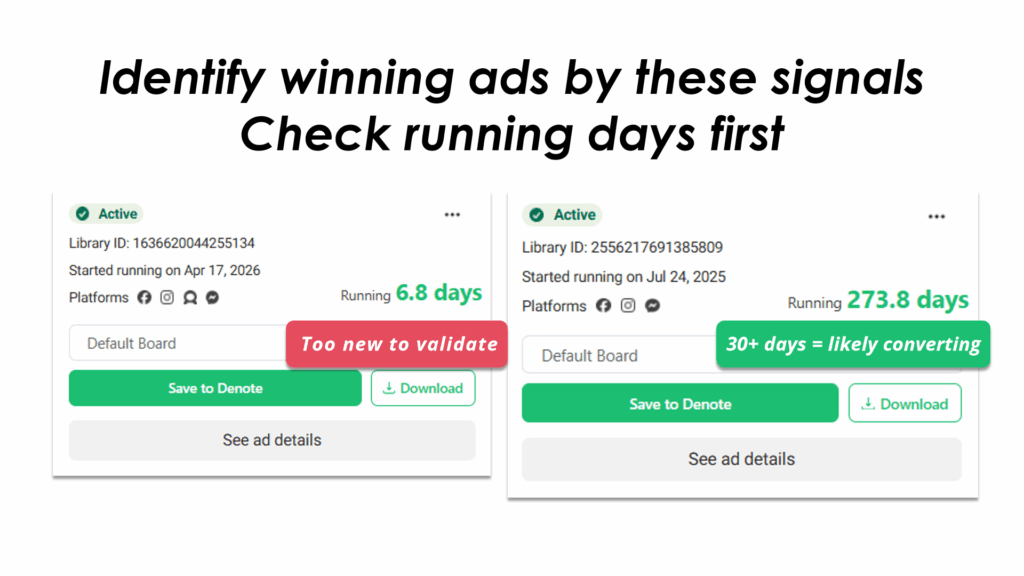
This means you have to read proxy signals instead of hard data. The most reliable signal is ad longevity: an ad that has been running for 30+ days with multiple creative variations is almost certainly converting, no advertiser keeps spending on something that doesn't work. An ad that appeared and disappeared in under two weeks likely didn't survive testing.
Pro tip: Don't ignore inactive ads. An ad that ran briefly and stopped is just as valuable as a long-runner, it tells you which angles failed. This negative data helps you avoid wasting budget on the same losing hooks your competitors already tried.
How to Search the Ad Library for Winning Keywords (Step by Step)
Step 1: Set up your search correctly before you start
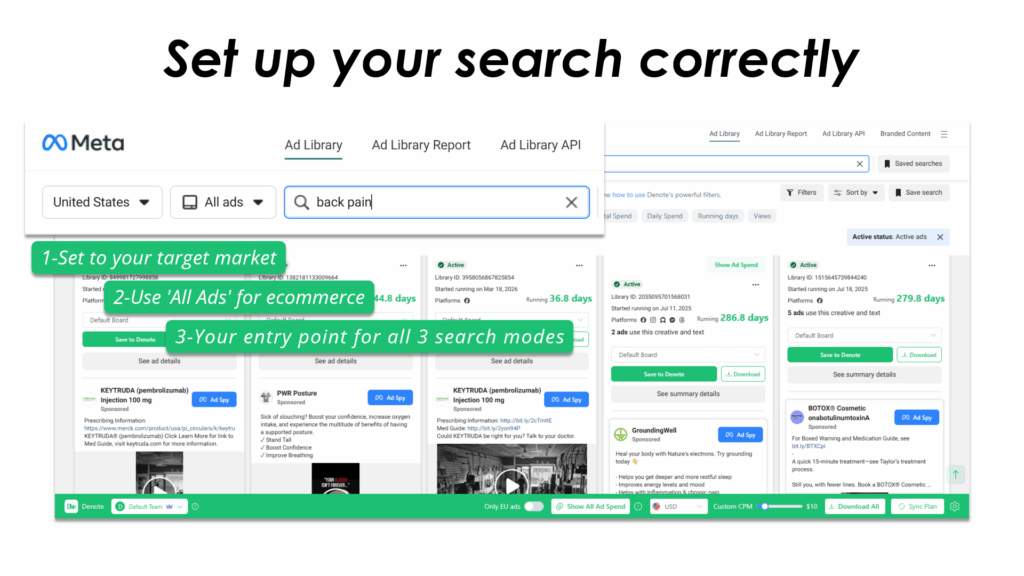
Most people open the Ad Library, type something in, and start scrolling. That works for casual browsing, but not for keyword research. Before your first search, configure three settings:
- Country: Set this to your target market, not your current location. Ad copy in the US market is often different from UK or Australian copy, even for the same brand. If you sell globally, run searches for each primary market separately.
- Category: Use "All Ads" for ecommerce and DTC research. The political, housing, and employment categories have separate disclosure requirements and are not relevant for most advertisers.
- Active vs. inactive: The default view shows active ads. Switch between active and inactive deliberately, active ads show you what's winning right now, inactive ads show you what was tested and abandoned.
Step 2: Search in three modes, not one
The biggest mistake in Ad Library research is only using one type of search query. There are three modes, each revealing different keyword intelligence:
Brand mode
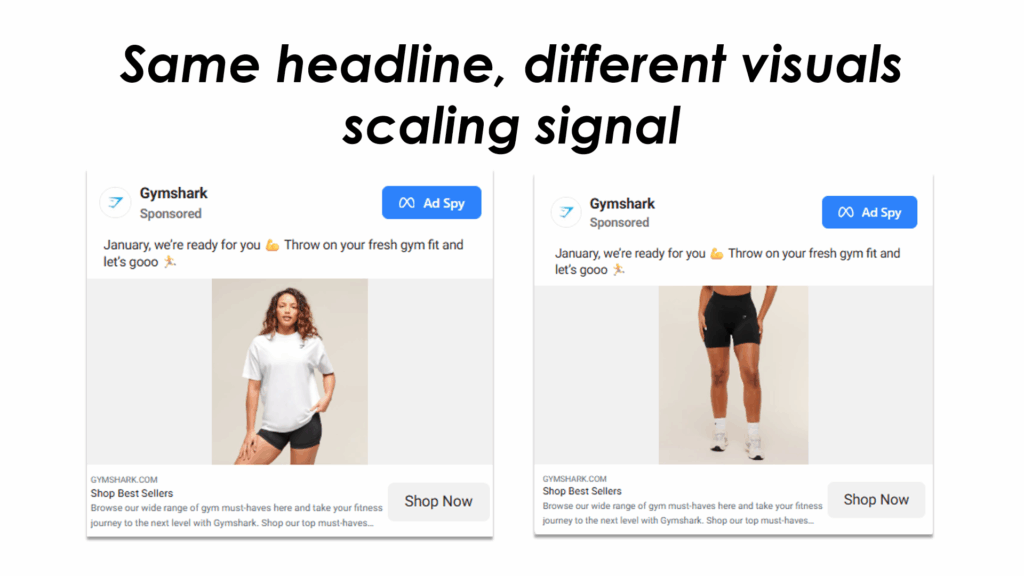
Search your competitor's exact page name. This shows you their full active ad library, every headline, hook, and offer they're currently running.
What to look for: Are they running multiple ads with the same headline but different visuals? That's a scaling signal, the headline language is proven. Are they testing completely different angles simultaneously? That tells you they haven't found a clear winner yet, which means the space is still open.
Use Meta Verified checkmarks to confirm you're viewing the official brand page, not a fan page or parody account.
Category mode
Search broad category terms, "waterproof shoes," "natural dog treats," "home gym equipment." This gives you a horizontal view across your entire competitive landscape, not just specific brands you already know.
Category searches reveal new entrants you weren't tracking, and they surface the dominant angles being used across the category. If 80% of ads in a category lead with a price angle, that's market saturation, and it's your signal to find a different lead.
Angle mode
This is the most powerful and least-used search mode. Instead of searching brand names or product categories, search the specific language you think might resonate with your audience.
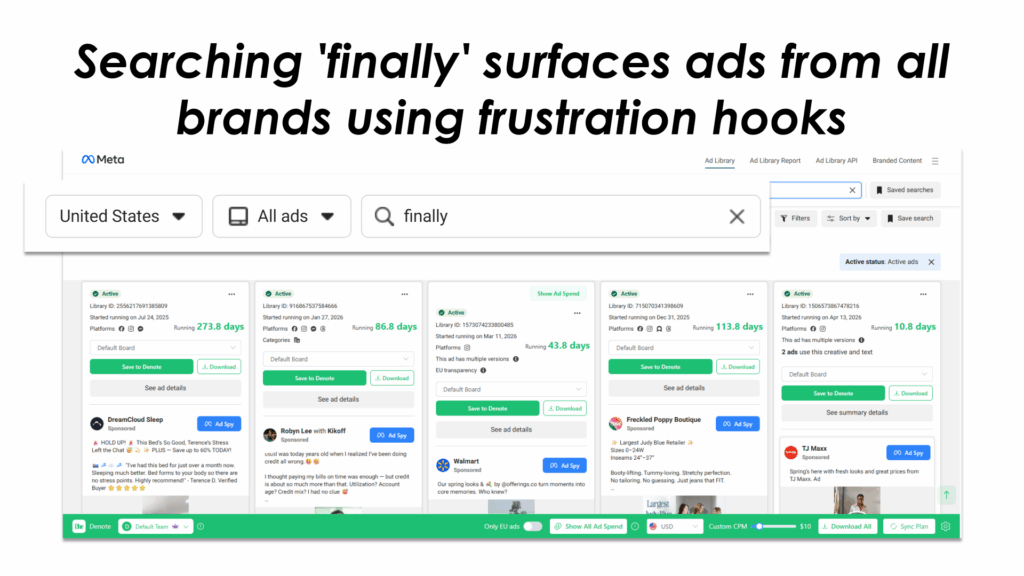
Examples: search "back pain" instead of competitor brand names. Search "no chemicals" instead of product category. Search "finally" or "stop struggling" to find ads leading with a frustration hook. Search "free shipping" to benchmark how aggressively competitors are using friction reducers.
Angle mode searches return ads from across the entire category that use that specific language, giving you a direct comparison of which brands are betting on which emotional angles, and which of those bets appear to be paying off based on how long the ads have been running.
Step 3: Identify winning ads by these signals
Once you have results, you need to filter for ads worth studying. Not every active ad is a winner, some are brand new tests that haven't proven themselves yet. Look for these signals:
- Running 30+ days: The clearest signal that an ad is converting. Budget survival is the best performance proxy available.
- Multiple creative variations from the same brand: If a brand has 8 ads running with the same headline but different images or videos, they've found a winning copy angle and are scaling creative around it. The copy is your keyword, the visuals are just the wrapper.
- Consistent messaging across a brand's entire library: If the same value proposition appears in 70% of a brand's ads, that's their positioning, and it's working. This gives you clear signal about which emotional territory they've claimed.
- Inactive ads that ran briefly: Two weeks or less usually means a failed test. Log what language these ads used, you now know what not to test.
Step 4: Extract the keyword patterns, not just the ads
This is where most researchers stop short. They save interesting ads, but they don't extract the underlying keyword patterns. Saving ads gives you a swipe file. Extracting patterns gives you a strategy.
Here's a simple extraction framework. For each ad you decide is worth studying, log:
- The hook type (pain/desire/curiosity/identity)
- The specific trigger word or phrase (the first 5 words of the headline)
- The outcome promised (and how specifically it's quantified)
- The audience marker (who is being spoken to)
- The funnel stage implied (awareness/consideration/conversion based on CTA and copy length)
After doing this for 15-20 ads across your category, build a Keyword Angle Matrix: a simple table where rows are keyword types (pain words, outcome words, identity words, urgency words) and columns are the specific terms you've found. This matrix becomes the brief for your creative team, they know exactly which angles to test first, and in which priority order based on how many winning ads are using each angle.
How to Turn Ad Library Keywords into Targeting and Creative
From keyword to interest cluster in Ads Manager
Once you've extracted keyword angles from the Ad Library, the next step is translating them into Facebook's targeting system. The bridge is Ads Manager's Detailed Targeting search, but you have to use it correctly.
Don't just paste your keyword into the targeting search and pick the first result. Use it as an idea expansion tool. Type your seed term and let Meta suggest related interests, then evaluate each suggestion for intent fit, not just audience size.
The goal is to build interest clusters: groups of 3-7 related interests that share the same underlying buyer intent. Keep each cluster in a separate ad set. Mixing different intent clusters into a single ad set makes it impossible to know what's actually driving performance.
Examples of how keyword angles translate to clusters:
- Pain angle ("back pain"): cluster could include lower back pain, chronic pain management, physical therapy, ergonomic furniture, pain relief.
- Identity angle ("busy moms"): cluster could include parenting, working mothers, meal prep, time management, mompreneur.
- Outcome angle ("weight loss"): cluster could include healthy eating, calorie counting, intermittent fasting, fitness motivation, body transformation.
Match your ad copy to the keyword cluster
This is the most commonly skipped step, and the most impactful one. The rule is simple: whatever angle your targeting cluster is built around, your ad copy needs to lead with that same angle.
If your targeting cluster is built around the "chronic back pain" angle, your headline should not be "Introducing the AlignPro Lumbar Cushion." It should be something like "Finally, something that actually works for lower back pain." The keyword angle in targeting and the hook in copy need to be speaking the same language.
When targeting and copy are misaligned, Facebook's relevance signals drop, which means higher CPMs and worse delivery even if your audience targeting is technically correct. Alignment creates a compounding effect: better relevance scores, lower costs, and higher conversion rates, because the user who sees the ad feels like the ad was written for them specifically.
Build long-tail keyword clusters for focused testing
Broad interest clusters are fine for initial reach, but long-tail clusters give you cleaner data and often better performance because they reach higher-intent subsets of your audience.
A long-tail cluster starts with a specific problem or desire, then narrows by context or identity. Instead of "fitness," build a cluster around "fitness for people recovering from injury." Instead of "skincare," build one around "skincare for hormonal acne in adults."
The Ad Library is particularly useful for identifying long-tail angles, because you can search for highly specific phrases and see if any advertisers are running successful campaigns against them. If you find a 60-day-old ad leading with a very specific hook, say, "for women over 40 with sensitive skin", that's evidence that this niche angle is converting well enough to sustain spend. That's your green light to build a cluster around it.
Label each cluster with the specific hypothesis it's testing. "Cluster A: pain-angle buyers, chronic back pain, 35-55" tells you exactly what you're testing and what you expect it to find. Generic labels like "Interest Stack 3" make it impossible to learn from your results.
How to Save and Organize Your Keyword Research from the Ad Library
The problem: Ad Library research doesn't save itself
Here's what happens to most Ad Library keyword research: you find three or four compelling competitor ads with strong hook language, you screenshot them or copy the URLs, and you move on. Two weeks later, you need that research, and the screenshots are buried in a downloads folder with no context, or the Ad Library links have gone dead because the ads were deactivated.
This is a structural problem with how people do Ad Library research. The insight generation is solid. The capture and organization is broken. The result is that every research session starts from scratch, because there's no compound learning, nothing accumulates.
The three specific failure modes:
- Links expire: Ad Library URLs for inactive ads break over time. If you saved a link to a high-performing competitor ad that later stopped running, that link is gone.
- Screenshots lose metadata: You know you saved this ad because it was interesting, but you can't search screenshots by hook type, competitor name, or angle category.
- Research stays individual: The media buyer and the creative strategist are doing parallel research with no shared system. The same competitor ad gets studied twice, and insights never make it from one person to the other.
How to use Denote to capture winning keywords as you research
The Denote Ad Library Extension is built for exactly this workflow. When you find a competitor ad with strong keyword language in the Ad Library, you save it to Denote in one click, and it captures the ad copy, headline, and the date it was first seen, all automatically.
The specific advantage for keyword research: you can organize saved ads into boards by keyword angle. Create a board for "pain-angle ads," another for "outcome-angle ads," another for "identity-angle ads." As you do research over weeks and months, each board builds into a curated library of the best examples for each angle type.
When a competitor deactivates an ad, which happens constantly, your saved version in Denote remains intact with all the copy and metadata. You don't lose the research just because the original source disappeared.
And because Denote is a shared workspace, the media buyer and the creative strategist are looking at the same research. The keyword angles extracted from the Ad Library become the actual brief for creative production, no translation layer, no information lost in handoff.
Build a living keyword swipe file, not a dead screenshot folder
The goal is to transform Ad Library research from a one-time activity into a compounding asset. Here's what a sustainable system looks like in practice:
- Weekly research session (20 minutes): Run 3-5 angle searches in the Ad Library. Save anything with strong hook language that has been running 30+ days. Add a short note with why it was worth saving, what angle, what hook type, what outcome promise.
- Monthly angle review (30 minutes): Look at what's accumulated in each board. Are certain angles showing up consistently across multiple competitors? That's convergence, the market is validating an angle. Prioritize those in your next testing cycle.
- Quarterly keyword matrix update: Update your Keyword Angle Matrix with new terms and angles. Flag any angles that were hot 6 months ago but are no longer showing up in active ads, those are burning out and need to be deprioritized.
After three months of consistent research, you'll have something that no keyword research tool can give you: a curated, contextualized library of angle-specific evidence from your exact competitive landscape, updated continuously and organized around the hypotheses your campaigns are testing.
Common Mistakes to Avoid
Searching only by brand name and missing angle keywords
Brand-mode searching is the default for most advertisers, and it's the least efficient way to do keyword research. When you only search competitor names, you see their ads, but you miss the wider landscape of what language is working across the category.
The advertisers running the most effective angle-specific campaigns in your niche might not be brands you're currently tracking. They could be smaller players who found a niche angle early, or recent entrants who are testing aggressively. Angle-mode searching surfaces these players automatically, because you're searching the language, not the brand.
Make angle searches the majority of your research time, not the minority. Brand searches are for monitoring specific competitors. Angle searches are for discovering what's actually working in the market.
Saving ads but never extracting the keyword patterns
A swipe file full of saved ads is better than nothing. But it's not keyword research, it's creative inspiration. The extraction step is what turns a swipe file into a strategy.
If you're saving ads without logging the specific hook words, outcome promises, and audience markers, you're doing 80% of the work and getting 20% of the value. Build the extraction habit: every time you save an ad, write one sentence about why it's worth keeping and what specific language element makes it interesting. That annotation is the research. The saved ad is just the evidence.
Treating keyword research as a one-time task
Facebook advertising is not a static environment. What converts in January may be burned out by June. New competitors enter with new angles. Audience fatigue shifts which hooks feel fresh versus overused. The competitive landscape changes every quarter.
Keyword research done once, even if done well, has a shelf life. The language that was novel and high-converting 12 months ago may now be so saturated that it's actively hurting performance, because every ad in the category sounds the same.
The solution is to make Ad Library research a recurring habit, not a one-time project. Twenty minutes a week, consistently, will keep your keyword angles current. It will also help you catch emerging angles early, before they're saturated, which is when they perform best.
Conclusion
The Ad Library is one of the most underused research tools in digital advertising, not because people don't know it exists, but because they don't know how to extract structured keyword intelligence from it.
The system in this guide gives you that structure. Start with a clear understanding of what Facebook keywords actually are and where they show up. Use the three search modes, brand, category, and angle, to surface validated language from across your competitive landscape. Extract the specific hook words, outcome promises, and identity markers that are showing up in long-running ads. Translate those into tightly-themed interest clusters and matched ad copy. And save your research in a system that compounds over time instead of evaporating into expired links and unsearchable screenshots.
The brands consistently finding winning angles aren't doing more research, they're doing more systematic research. Build the system once, run it weekly, and your keyword intelligence becomes a durable competitive advantage.
Start building your keyword swipe file today with the Denote Ad Library Extension, save winning ads from the Ad Library in one click, organize by keyword angle, and share research with your team in a shared workspace.


