.jpg)

Competitor ad tracking is useful to a mobile game UA team when it produces a weekly change log: which rival creatives appeared, which moved in a defined chart, where they were observed, and what deserves a test in your own game? A single screenshot cannot answer those questions. Compare the same scope each week, inspect the actual creative, and separate a ranking signal from campaign performance.
This workflow uses Denote Top Ads to discover game and app creatives across the channels visible in its charts. It focuses on a repeatable cross-channel review, rather than another walkthrough of how to research Facebook competitor ads. The examples describe what a UA team can observe; they do not reveal a competitor's installs, spend, retention, or ROAS.
TL;DR
- Set a fixed game category, region, week, channel scope, and format before recording a competitor ad tracking baseline.
- Review Weekly Rising for movement, Weekly Trending for high weekly popularity, and New Creatives for newly observed executions. These are different lists, so keep their ranks separate.
- Log the creative itself: first scene, gameplay promise, offer, call to action, format, observed channel, landing destination, and a source link.
- Compare this week's record with last week's record by creative identity. A missing ad, a new variant, and a rank change are different findings.
- Turn one verified observation into one test brief, then judge it with your own UA data.
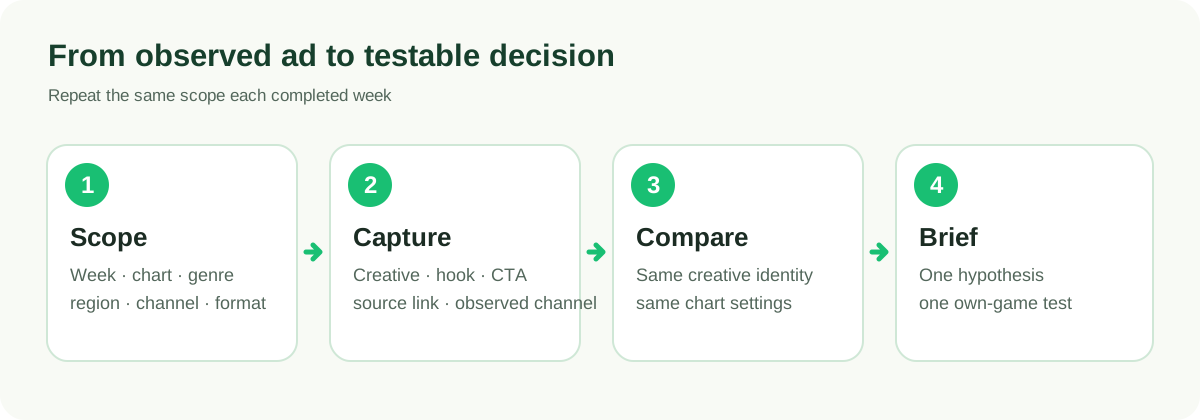
Illustration: a suggested monitoring cycle, not an automated Denote feature or a live ranking.
What competitor ad tracking can and cannot reveal
For a game or app team, competitor ad tracking starts with visible evidence. An ad preview can show whether a rival opens with gameplay, a character, a puzzle, a creator, or a reward. A chart can show where the creative appeared in a specified weekly ranking and which channels the source associated with it. A destination can tell you whether the ad sends viewers to an app store or another page.
None of these observations proves that the rival increased budget or acquired profitable players. Denote's weekly creative score is a popularity signal within a chart. A displayed impression figure is a provider estimate, not platform-verified delivery. A first-seen date is when the source observed the ad, not necessarily its first launch anywhere. Keep these distinctions next to the screenshot or metric in your log.
Use a small watchlist instead of trying to monitor every app in a genre. Include direct competitors with a similar player promise, adjacent games that target the same creative problem, and one or two reference publishers with different production styles. Mark why each title belongs on the list; otherwise the review becomes a collection of unrelated ads.
Set a comparable weekly competitor ad tracking baseline
Choose one completed week and write down the chart settings before scanning. In Denote Top Ads, select Game or Tool according to the product you are studying, then record the chart, week, category tag, channel, region, language, operating system, format, and any deduplication setting you used. Record your access level and the number of visible rows reviewed. If a filter is unavailable, leave the limitation in the note instead of assuming the visible rows represent the whole market.
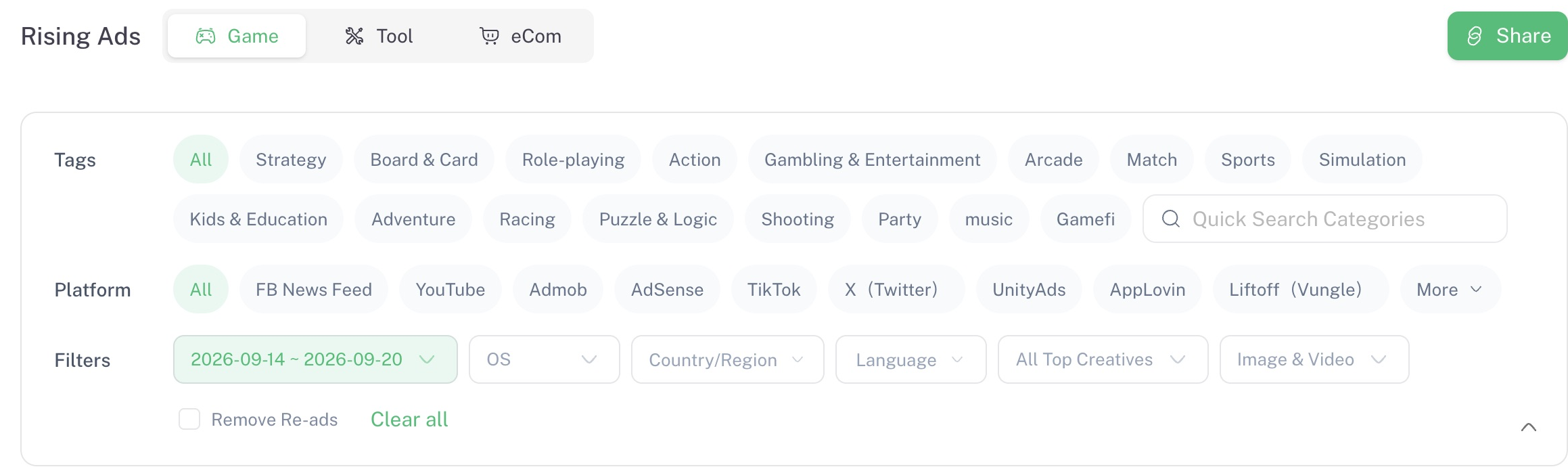
Product screenshot: Denote Workspace Rising Ads → Game, week of September 14–20, 2026, captured September 24, 2026. It illustrates how to record a chart's scope; it is not the current week's result.
For a cross-channel watchlist, start with All channels so you do not miss a creative that appears outside your usual network. Then inspect specific channel cuts only when your access allows them. A row with multiple channel icons tells you where the source associated that creative; it does not say how spend was allocated between those channels. If you later compare a TikTok-only view with a Facebook-only view, label them as separate cuts.
Your first review creates a baseline. The next review becomes a comparison only if the chart type, category, filters, and selection rule stay consistent. A different region or a changed format filter can make a creative disappear from your view without the advertiser stopping it.
Review the three boards for different changes
Competitor ad tracking works best when each board answers one question:
Avoid treating “rank 3 on Rising” and “rank 3 on Trending” as equivalent. The boards answer different questions. Likewise, do not add provider display estimates across weeks and call the total monthly impressions.
For each watchlist title that appears, open the creative before writing a conclusion. Note the hook, the game action shown, the on-screen claim, the visual payoff, the store or landing destination, the format, and the observed channel. If several rows point to the same title, inspect whether they are distinct creative executions or repeated entries. A publisher's presence in several rows is not, on its own, evidence of several successful campaigns.
Keep a weekly change log your team can reproduce
The core output of competitor ad tracking is a short, auditable log. A spreadsheet or shared document is enough; the chart does not have to become a new dashboard.
Compare records by creative identity, not just brand name. If you cannot establish that two rows represent the same creative, call them variants or separate observations. If an ad is absent this week, write “not seen in the reviewed chart and scope,” rather than “the competitor stopped running it.”
One useful weekly review is deliberately small: scan the visible rows, inspect the few that match your watchlist or creative question, and send the team no more than a handful of clear hypotheses. More screenshots will not help if nobody can explain what changed.
Turn a monitored ad into a game UA test
Competitor ad tracking should finish with a decision the creative team can act on. Use this format:
Observed: A rival's video opens with a recognizable gameplay decision before it shows a character or reward. Source: named creative, chart week, observed channel, and review date.
Uncertain: The chart cannot show its conversion rate or whether the same idea worked on every network.
Hypothesis: Showing our core decision earlier may make the player fantasy clearer.
Test: Produce two openings with the same game footage, audience, offer, and destination; vary only the opening sequence.
Measure: Use our own qualified installs and downstream player quality within the team's normal test window.
This is an illustrative brief, not a claim about a named advertiser. Keep the mechanic and promise true to your own game. Borrow a question to test, not another publisher's footage, characters, or unsupported claim.
Common competitor advertising monitoring mistakes
Competitor ad tracking loses value when an observation is treated as a business outcome or compared across different scopes.
Calling an observed ad a winner. A weekly rank or long observed duration is a reason to investigate. It does not reveal CPI, ROAS, retention, or profit.
Changing scope between reviews. Keep a stable primary view. Put new regions, channels, or formats in separate tabs with their own source notes.
Treating a brand as one creative. One game may have different hooks, formats, and localized copy in the same week. Compare executions at the creative level.
Inferring channel budget from channel presence. A listed channel shows detection, not spend share or coordinated cross-channel sequencing.
Skipping the handoff. A gallery of screenshots is hard to use. Record a testable pattern, uncertainty, an owner, and the date you will recheck it.
Start your next competitor ad tracking review
Open Denote Top Ads, choose the Game or Tool category and a completed week, and build a small watchlist from the visible creatives. Save the scope before taking notes. Next week, return to the same chart and filters, compare creative identities, and write one test brief for the strongest relevant change.
If your team needs a broader method for reading chart signals, see Mobile Ad Intelligence for Game UA Teams. For Facebook-only discovery, use the Facebook competitor research guide. Competitor ad tracking becomes valuable when the weekly record leads to a better experiment in your own game, not when it becomes a larger folder of ads.
FAQs
How often should a game team run competitor ad tracking?
A weekly review matches Denote Top Ads' completed-week charts. Add an ad hoc review when a launch or creative decision needs it, while keeping the weekly baseline consistent.
Can I compare game ads across TikTok, Facebook, and other channels?
Yes, if the source shows them and your access includes the relevant view. Record the channel for each creative and avoid treating appearances on different networks as equivalent delivery or performance.
Does ad tracking software for competitors show their ROAS?
No. Competitor ad tracking can show visible creatives and chart signals, but it cannot reveal a rival's private costs, installs, or ROAS. Use your own campaign data to evaluate an idea you test.


